Retro Fonts Procreate Stamps: A Practical Guide for Digital Artists
Digital illustration has evolved significantly, allowing artists to replicate traditional textures and vintage aesthetics with unprecedented ease. Among the many tools available to iPad users, Retro Fonts Procreate Stamps have emerged as a valuable resource for designers seeking to infuse their work with nostalgic charm. This collection offers a streamlined approach to incorporating typographic elements into digital art, bypassing the need for complex lettering skills or external software integration. By understanding what these stamps offer, how they function, and where they fit within a broader creative workflow, artists can make informed decisions about whether this tool aligns with their specific design goals.
Understanding Retro Fonts Procreate Stamps
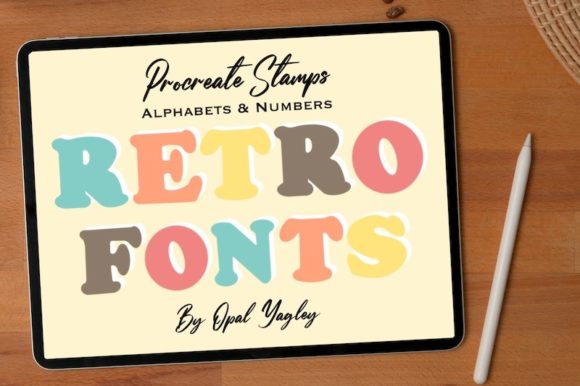
At its core, this product is a specialized brush set designed exclusively for the Procreate application on iPad. Unlike standard text tools that rely on system fonts, these stamps function as pre-designed graphical elements. The collection includes a total of 36 stamps, comprehensively covering the alphabet from A to Z and numbers from 0 to 9. This structure allows users to "stamp" individual characters onto their canvas, creating custom phrases, titles, or decorative text blocks.
The term Retro Fonts Procreate refers to the aesthetic style of these characters. They are crafted to mimic the imperfections, ink bleeds, and textured edges associated with mid-20th-century printing techniques. Whether you are aiming for a groovy 1970s vibe or a distressed industrial look, the Groovy Alphabet Stamp variations provide a consistent visual language. Because they are brushes rather than editable text layers, each stamp retains its unique artistic integrity, ensuring that the final output looks hand-crafted rather than digitally generated.
Why Artists Choose Letter Stamps and ABC Stamps
The primary appeal of using Letter stamps and ABC stamps lies in efficiency and aesthetic consistency. Hand-lettering is a skill that requires significant practice to master. For illustrators who excel in drawing but struggle with typography, these stamps bridge the gap. They allow for the creation of professional-looking typographic compositions without the steep learning curve associated with calligraphy or font design.
Furthermore, these tools offer a level of texture that is difficult to achieve with standard digital fonts. Standard typefaces often appear too clean and sterile, lacking the organic warmth of printed material. Retro Fonts Procreate Stamps introduce natural irregularities, such as varying ink density and edge roughness. This adds depth and character to designs, making them feel more tactile and authentic. For projects requiring a vintage, handmade, or artisanal feel, these stamps provide an immediate solution that enhances the overall mood of the artwork.
Evaluating Benefits and Tradeoffs
When considering the adoption of any new digital tool, it is essential to weigh the advantages against potential limitations. The benefits of this brush set are clear: speed, ease of use, and high-quality retro aesthetics. The inclusion of both letters and numbers (0-9) ensures versatility, allowing for the creation of dates, prices, or numeric codes alongside textual content. The seamless integration into Procreate’s Brush Library means that once installed, the stamps are always accessible within the artist’s existing workflow.
However, there are tradeoffs to consider. Since these are stamps and not vector-based text, they are raster images. This means that scaling them up significantly beyond their original resolution may result in pixelation or loss of clarity. Additionally, because each character is a separate stamp, kerning and spacing must be managed manually. Users cannot simply type a sentence and adjust the tracking with a slider; instead, they must place each letter individually, which can be time-consuming for longer passages of text. Therefore, this tool is best suited for short headlines, logos, or decorative accents rather than body copy.
Ideal Use Cases for Groovy Alphabet Stamp Collections
This tool is a strong fit for specific types of creative projects. Graphic designers working on poster art, album covers, or social media graphics will find the Groovy Alphabet Stamp particularly useful for creating eye-catching headers. Illustrators who create zines, comics, or greeting cards can use these stamps to add dialogue bubbles or title pages that match the hand-drawn style of their illustrations.
Moreover, branding specialists who focus on niche markets such as craft beverages, vintage clothing, or artisanal goods can leverage these Procreate Brushes to develop logo concepts quickly. The ability to experiment with different arrangements and textures in real-time allows for rapid iteration during the brainstorming phase. If your goal is to produce assets that feel organic, weathered, or historically inspired, this stamp set aligns perfectly with those objectives.
When to Consider Alternatives
While Retro Fonts Procreate Stamps are powerful, they are not a universal solution. If your project requires extensive text editing, such as a multi-page brochure or a website layout, dedicated typography software or standard font files would be more appropriate. These alternatives allow for easy corrections, consistent spacing, and scalability without quality loss.
Additionally, if you require precise control over every curve and anchor point of a letterform, vector-based tools like Adobe Illustrator remain the industry standard. Stamps offer a fixed design; while you can change their color and size, you cannot alter the fundamental shape of the character. Artists who need fully customizable typography should consider investing in font creation software or hiring a type designer, rather than relying on pre-made stamps.
Installation and Technical Considerations
Proper installation is crucial for ensuring the brushes function correctly. It is important to note that you must be on your iPad when you download your file. The process is straightforward but requires specific steps to avoid errors. First, download the brushset through Safari, NOT the Procreate app. Attempting to open the file directly within Procreate may lead to compatibility issues or failed imports.
Once the download is complete, navigate to your downloaded files within the Files app on your iPad. Locate the file and choose the "Open In Procreate" option. The application will automatically install the stamps in the Brush Library section in Procreate. After installation, you can organize them into a dedicated folder for easy access. Ensuring your Procreate app is updated to the latest version is also recommended to guarantee full compatibility with the brush engine.
Making the Right Decision
Choosing whether to incorporate Retro Fonts Procreate Stamps into your toolkit depends on your specific creative needs. If you value speed, authenticity, and a vintage aesthetic, and if your projects primarily involve short typographic elements, this tool offers significant value. It removes the barrier of technical lettering skills while providing high-quality, textured results.
However, if your work demands high-volume text, precise vector editing, or scalable typography, you may find the manual nature of stamping limiting. By evaluating your typical project requirements and understanding the technical constraints of raster-based stamps, you can determine whether this collection complements your existing workflow. Ultimately, these stamps serve as a specialized instrument in the digital artist’s arsenal, best used when the goal is to evoke a specific era or handmade quality in digital design.