Blooming Spring Flowers Procreate Brushes: A Practical Guide for Digital Floral Illustration
Digital illustration on the iPad has evolved significantly, offering artists tools that bridge the gap between traditional media efficiency and digital flexibility. For creators focusing on botanical art, seasonal themes, or decorative design, the Blooming Spring Flowers Procreate Brushes represent a specialized resource designed to streamline the creation of complex floral elements. This brush set includes four distinct stamp brushes and a curated color palette, enabling users to generate hyacinths, lilacs, sakura, apple blossoms, and peach blooms with minimal effort. Understanding how these tools fit into a broader digital workflow is essential for artists evaluating whether this specific asset aligns with their creative needs.
Understanding the Tool: Stamp Brushes vs. Hand-Painting
The core functionality of the Blooming Spring Flowers Procreate Brushes lies in its use of stamp technology. Unlike standard round or textured brushes that require the artist to build form through repeated strokes, shading, and blending, stamp brushes deposit pre-designed shapes onto the canvas. This distinction is critical for users comparing different approaches to digital painting.
Hand-painting flowers from scratch offers ultimate control over every petal’s curvature and lighting condition. It is the preferred method for hyper-realistic botanical studies or when a unique, non-repetitive composition is required. However, this approach is time-intensive and demands a high level of technical skill in anatomy and light rendering. In contrast, stamp brushes provide immediate structural accuracy. The Spring blooming stamp brushes included in this set allow an artist to place a fully formed hyacinth cluster or a branch of sakura in seconds. This makes them particularly valuable for illustrators working under tight deadlines, such as those creating greeting cards, social media content, or pattern designs where volume and speed are prioritized over microscopic detail.
Evaluating the Contents: Versatility and Limitations
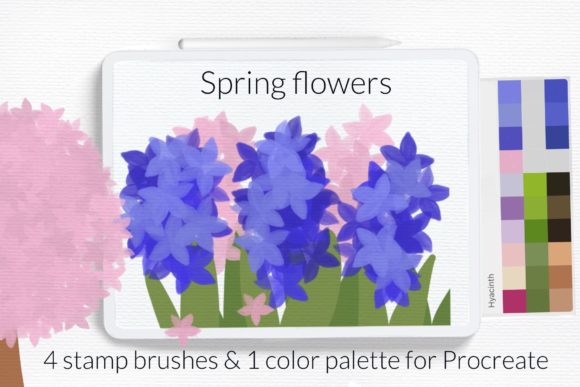
This specific brush set includes four stamp brushes and one color palette. While the quantity may seem modest compared to massive libraries containing hundreds of assets, the curation focuses on quality and cohesion. The inclusion of a dedicated color palette is a significant feature, as it ensures that the stamped elements integrate seamlessly without requiring extensive color correction. The palette is designed to mimic the soft, pastel tones typical of spring flora, reducing the cognitive load on the artist during the selection process.
The variety covers some of the most popular spring motifs: hyacinth, lilac, and fruit tree blossoms like sakura, apple, and peach. These choices reflect current trends in digital stationery and surface pattern design. However, artists should recognize the limitations. With only four brushes, the set does not offer a comprehensive library of all spring flowers. Users seeking roses, tulips, or daffodils will need to supplement this set with other resources or hand-paint those elements. Therefore, this tool is best viewed as a specialized accelerator for specific projects rather than a complete replacement for a general-purpose floral toolkit.
Installation and Technical Compatibility
Proper installation is crucial for ensuring the brushes function correctly within the Procreate environment. The package includes one brushset file and one swatches file. The installation process varies slightly depending on the version of Procreate and the iPad OS being used. For users with older iPads or Procreate version 4.0 and earlier, the manual import method is required.
To install using the legacy method, follow these steps:
- Download the files directly to your iPad.
- Open the file folder and locate the
.brushsetand.swatchesfiles. - Tap and hold the file with your finger or Apple Pencil to bring up the context menu.
- Select Share from the available options.
- If the option Open in Procreate is not immediately visible, click on More.
- Scroll through the list to find Open in Procreate and select it.
- Once imported, open your project in Procreate. Click on the brush icon at the top right corner to access the new brushes, or scroll down in the color palette library to find the imported swatches under the section labeled © Let s Art ♡.
For users on newer versions of Procreate, the process is often more streamlined, typically allowing direct tapping of the file to trigger an automatic import. However, understanding the manual method ensures compatibility across devices and prevents frustration if automatic imports fail due to software glitches or file permission issues.
Decision Factors: When to Choose This Brush Set
Choosing the right digital tools involves assessing your specific workflow, skill level, and project requirements. The Blooming Spring Flowers Procreate Brushes are an ideal choice for several specific scenarios:
- Pattern Designers: Creating seamless repeats requires consistent elements. Stamp brushes ensure uniformity in shape and size, which is difficult to achieve when hand-painting multiple instances of the same flower.
- Beginners and Hobbyists: Artists who struggle with the anatomical complexity of flowers can achieve professional-looking results quickly. This boosts confidence and allows them to focus on composition and color theory rather than structural drawing.
- Commercial Illustrators: For clients requesting quick turnarounds on spring-themed campaigns, these brushes significantly reduce production time. The ability to create a blooming tree in minutes rather than hours translates directly to improved hourly rates.
Conversely, this tool may not be suitable for fine art painters who prioritize unique, organic imperfections in every stroke. Stamp brushes can sometimes appear repetitive if used excessively without variation in opacity, rotation, or color. Artists who prefer a highly personalized, expressive style may find the pre-made shapes restrictive. In such cases, investing time in learning custom brush creation or mastering hand-painting techniques might yield more satisfying long-term results.
Comparing Approaches: Efficiency vs. Customization
When evaluating digital art resources, it is helpful to compare the tradeoffs between efficiency and customization. Standard brushes offer maximum customization but require maximum effort. Photo textures offer realism but lack stylistic flexibility. Stamp brushes, like those in this set, occupy a middle ground. They provide stylized realism with high efficiency.
Consider a project involving a background of distant apple blossoms. Hand-painting each blossom would be impractical and visually unnecessary, as details would be lost at a distance. Using a photo texture might look realistic but could clash with a hand-drawn foreground. A stamp brush allows the artist to populate the background quickly with shapes that match the stylistic tone of the foreground, maintaining visual harmony while saving time. This balance is the primary value proposition of the Blooming Spring Flowers Procreate Brushes.
Maximizing Value Through Technique
To get the most out of this brush set, users should employ techniques that mitigate the inherent repetitiveness of stamps. Rotating the canvas or adjusting the brush rotation settings can introduce natural variation. Layering multiple stamps with different opacities creates depth, mimicking the way light filters through dense clusters of flowers. Additionally, using the included color palette as a base, then subtly shifting hues with the color dynamics settings, can prevent the artwork from looking flat or monochromatic.
Furthermore, combining these stamp brushes with standard texture brushes can enhance realism. Adding hand-painted leaves or stems connects the stamped flowers to the rest of the composition, grounding them in the scene. This hybrid approach leverages the speed of the stamps while retaining the artistic touch of manual painting.
Final Considerations for Digital Artists
The Blooming Spring Flowers Procreate Brushes serve as a targeted solution for a specific niche within digital illustration. They are not a universal fix for all floral drawing challenges, but they are a powerful asset for those who frequently depict spring blooms. By understanding the installation process, recognizing the strengths of stamp technology, and acknowledging the limitations of a four-brush set, artists can make an informed decision about whether this tool fits their repertoire.
For professionals seeking to optimize their workflow and hobbyists looking to overcome technical barriers, this set offers a practical, efficient path to creating beautiful spring-themed artwork. As with any digital tool, its effectiveness depends on the user’s ability to integrate it thoughtfully into their broader creative process. Evaluating your current project needs against the capabilities of these brushes will ensure that you utilize them to their full potential, enhancing both the quality and speed of your digital illustrations.