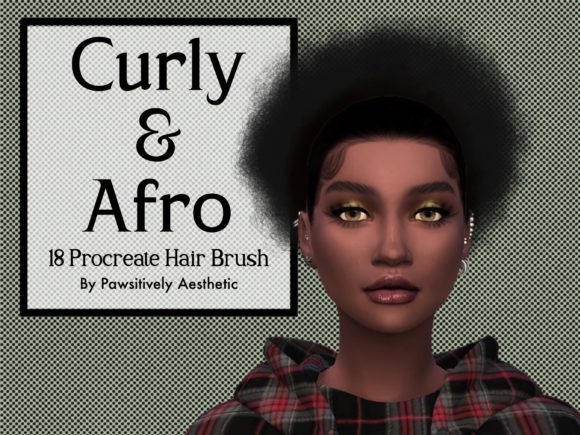
Mastering Character Design with a Curly Hair Brush Set for Procreate
Digital illustration has evolved rapidly, transforming from simple pixel art into complex, textured masterpieces that rival traditional media. For character designers, concept artists, and illustrators, hair remains one of the most challenging elements to render convincingly. It requires an understanding of volume, flow, texture, and light. Specifically, rendering curly and afro-textured hair demands a nuanced approach that goes beyond standard straight-line strokes. This is where specialized tools become invaluable. A dedicated Curly Hair Brush Set for Procreate offers a streamlined solution, allowing artists to achieve realistic, voluminous results with greater efficiency and artistic control.
The Challenge of Rendering Textured Hair Digitally
Traditional digital brushes often default to smooth, uniform strokes. While these are excellent for sleek, straight hair, they fall short when attempting to capture the intricate coil patterns and dense volume of curly or afro-textured hair. Artists frequently spend hours manually drawing individual curls, adjusting opacity, and layering colors to create depth. This process, while rewarding, can be time-consuming and may lead to repetitive strain or creative fatigue. Furthermore, achieving consistency across different characters or within a single illustration can be difficult when relying solely on generic round brushes.
The complexity lies in the structure of the hair itself. Curly hair does not fall in straight lines; it forms spirals, zig-zags, and clumps that interact with light differently than straight strands. Highlights appear on the outer curves of the coils, while shadows nestle deep within the clusters. Replicating this naturally requires a tool that understands these forms. A specialized brush set addresses this by embedding the texture logic directly into the brush engine, allowing the artist to focus on placement and composition rather than micro-managing every strand.
Enhancing Workflow Efficiency and Creative Freedom
Integrating a custom brush set into your digital toolkit is not about taking shortcuts; it is about optimizing your workflow to maximize creative output. When you use a Curly Hair Brush Set for Procreate, you reduce the technical friction between your idea and its visualization. Instead of constructing a curl from scratch, you can lay down foundational shapes quickly, establishing the overall silhouette and volume of the hairstyle in minutes rather than hours.
This efficiency is particularly beneficial for professionals working under tight deadlines, such as comic book artists, storyboard creators, and freelance illustrators. It allows for rapid iteration. You can experiment with different hairstyles, lengths, and densities without committing excessive time to each variation. This freedom encourages exploration, leading to more diverse and dynamic character designs. For hobbyists and students, it lowers the barrier to entry, making complex textures accessible and encouraging practice without the frustration of unmanageable technical hurdles.
Key Features of a Professional Grade Brush Set
Not all digital brushes are created equal. A high-quality brush set designed for Procreate should offer more than just a single stamp. It needs to provide versatility and adaptability to various artistic styles. Here are the essential characteristics to look for:
- Varied Curl Patterns: The set should include multiple brush variants, ranging from tight coils to loose waves. This variety ensures that you can mimic different hair types and textures accurately.
- Pressure Sensitivity: The brushes must respond dynamically to Apple Pencil pressure. Light touches should create soft, faint strands, while heavier pressure produces bold, defined curls. This responsiveness is crucial for adding depth and dimension.
- Texture and Grain: Real hair is not perfectly smooth. High-quality brushes incorporate subtle grain or noise to mimic the natural frizz and texture of hair, preventing the "plastic" look that often plagues digital art.
- Layering Capability: The brushes should be designed to layer well. You should be able to build up density by overlapping strokes without the image becoming muddy or losing clarity.
When you download a premium Curly Hair Brush Set for Procreate, you are investing in these engineered features. The brushes are calibrated to work seamlessly with Procreate’s native engine, ensuring smooth performance on iPad devices.
Practical Applications Across Industries
The utility of a specialized hair brush extends beyond personal art projects. Various industries benefit from the ability to render diverse hair textures quickly and authentically.
Character Design and Concept Art
In gaming and animation, character diversity is paramount. Designers need to create protagonists and NPCs with distinct looks that reflect real-world demographics. A robust brush set allows concept artists to prototype hairstyles that are culturally accurate and visually striking, enhancing the authenticity of the character roster.
Editorial and Fashion Illustration
Fashion illustrators often emphasize hair as a key component of style. The ability to draw voluminous, textured hair adds drama and flair to editorial pieces. Whether illustrating for a magazine spread or a brand campaign, realistic hair textures elevate the perceived quality of the artwork.
Educational Resources
Educators teaching digital art can use these tools to demonstrate principles of form and light. By showing students how to build complex structures from simple brush strokes, instructors can clarify abstract concepts regarding volume and shading.
Installation and Technical Requirements
Using digital assets requires a straightforward setup process. For those new to Procreate, understanding how to install and manage brush sets is essential. The Curly Hair Brush Set for Procreate is distributed as a digital download, specifically formatted for ease of use on iPad devices.
Upon purchase, you will receive a .brushset file. This file format is exclusive to Procreate and ensures that all brush settings, including size, opacity, and texture, are preserved exactly as the creator intended. To install the set, follow these steps:
- Download the file to your iPad. It will typically appear in the Files app under the Downloads section.
- Locate the
.brushsetfile and tap on it once. - Procreate will automatically open, and the brush set will be imported into your brush library.
- You can then find the new brushes in your designated brush folder, ready for immediate use.
It is important to note that this is a digital product only. No physical items will be shipped. Ensure you have the Procreate app installed on your iPad before purchasing, as the brushes are incompatible with other software or operating systems.
Ethical Use and Intellectual Property
When utilizing third-party digital assets, respecting intellectual property rights is crucial. The creators of these brush sets invest significant time and expertise into developing tools that enhance the community’s creative capabilities. Therefore, users must adhere to specific usage guidelines.
Typically, you are granted a license to use the brushes for personal and commercial projects. This means you can create artworks, illustrations, and designs using the brushes and sell those final images. However, you are strictly prohibited from redistributing the brush files themselves. You cannot claim the brush set as your own, copy the files for distribution, share them with others, or resell them in any form. Doing so undermines the creator’s livelihood and violates copyright laws.
If you encounter any issues with the download or installation, most creators encourage reaching out directly for support. This direct line of communication helps resolve technical glitches and ensures a positive user experience.
Expanding Your Digital Toolkit
A hair brush set is just one component of a comprehensive digital art toolkit. To get the most out of your Curly Hair Brush Set for Procreate, consider combining it with other specialized tools. Skin tone brushes, fabric texture sets, and lighting overlays can complement your hair rendering, creating cohesive and polished illustrations.
Furthermore, staying updated with new tools is vital in the fast-paced world of digital art. Following creators and shops that specialize in Procreate resources ensures you have access to the latest innovations. Many developers regularly release updates, new brush variants, and tutorial content to help users maximize their potential.
By integrating high-quality, specialized brushes into your workflow, you not only improve the aesthetic quality of your work but also deepen your understanding of digital media. You learn to leverage technology to serve your artistic vision, rather than letting technical limitations dictate your output. Whether you are a seasoned professional or an enthusiastic beginner, the right tools can transform your creative journey, making the process of bringing characters to life both enjoyable and efficient.
Ultimately, the goal is to create art that resonates. Authentic representation matters, and having the tools to depict diverse hair textures accurately contributes to a more inclusive and rich visual landscape. Embrace the possibilities that digital tools offer, and let your creativity flow without boundaries.