Mastering Dot Art and Lettering with the Dotello Procreate Dot Paint Brush Set
Digital art has evolved rapidly, moving from simple sketches to complex, texture-rich illustrations that rival traditional media. For iPad users, the Dotello Procreate Dot Paint Brush Set represents a specialized tool designed to bridge the gap between technical precision and artistic expression. This isn’t just another generic brush pack; it is a curated collection aimed at artists who value the nuance of stippling, the rhythm of dot work, and the clean lines required for modern calligraphy.
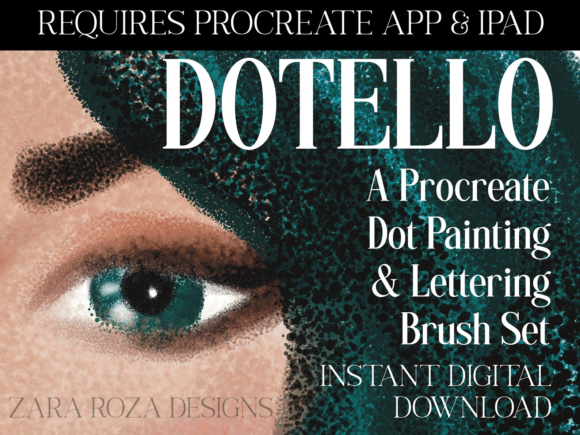
Whether you are a seasoned graphic designer looking to streamline your workflow or a hobbyist eager to explore pointillism without the physical mess of ink and paper, understanding how this tool fits into your creative process is essential. The set offers an instant digital download experience, providing four distinct .brushset files that cater to both freehand drawing and structured lettering.
Why Dot Work Matters in Modern Digital Illustration
Dot art, or stippling, is a technique that relies on the placement of individual dots to create tone, texture, and form. In traditional media, this is a time-consuming process that requires immense patience. A single slip of the hand can ruin hours of work. The Dotello Procreate Dot Paint Brush Set digitizes this process, allowing artists to achieve consistent results with greater speed and flexibility.
The primary advantage here is control. When you use these brushes within the Procreate app on your iPad or iPad Pro, you gain the ability to adjust opacity, size, and spacing dynamically. This means you can build up shadows gradually, creating smooth gradients that look organic rather than pixelated. For portrait artists, this is invaluable. Skin tones are rarely flat; they have subtle variations in texture and color. Using dot-based brushes allows you to mimic the natural porousness of skin, adding a layer of realism that solid-fill brushes often miss.
Real-World Applications for Creators and Professionals
The versatility of this brush set extends far beyond simple doodles. Different professionals can leverage these tools in unique ways to enhance their output and efficiency.
Portrait and Character Artists
For those specializing in character design or portrait art, shading is critical. The Dotello Part 1 and Part 2 brushes allow for intricate shading techniques. Imagine working on a digital portrait where you need to render the soft shadow under a chin or the highlight on a nose. Instead of using a standard airbrush, which can sometimes look too "digital" or soft, dot brushes add a tactile quality. They break up large areas of color, making the illustration feel more handcrafted. This is particularly useful for artists aiming for a vintage or editorial illustration style, where texture adds depth and interest.
Graphic Designers and Brand Identity Specialists
In the world of branding, uniqueness is currency. Generic stock vectors often fail to capture a brand’s personality. Graphic designers can use the Dotello Procreate Dot Paint Brush Set to create custom textures for logos, packaging, or social media assets. By incorporating stippled elements into a design, you add a layer of sophistication and artisanal charm. This is especially effective for brands in the wellness, organic food, or handmade goods sectors, where a "human touch" is part of the marketing appeal.
Calligraphers and Hand Lettering Enthusiasts
One of the standout features of this package is the inclusion of Lettering Editions. Standard drawing brushes can sometimes feel jagged or inconsistent when used for long, flowing strokes. The Dotello Part 1 LETTERING Edition and Part 2 LETTERING Edition are optimized specifically for smoother strokes. If you are creating wedding invitations, quote posters, or journal headers, these brushes ensure that your lines remain fluid and elegant. The streamlining reduces the friction that often occurs when drawing fast curves on glass screens, resulting in cleaner, more professional-looking typography.
Exploring Landscape and Abstract Art
Landscape art often suffers from looking too uniform in digital formats. Trees, clouds, and water have complex textures that are difficult to replicate with solid colors. Using the dot paint brushes, artists can create foliage that feels dense and varied. By varying the pressure on the Apple Pencil, you can control the density of the dots, mimicking the way light filters through leaves. Similarly, for abstract artists, these brushes offer a way to experiment with pattern and rhythm. You can build up layers of dots in contrasting colors to create optical mixing effects, where the eye blends the colors together from a distance.
Technical Considerations and Compatibility
Before purchasing or downloading, it is crucial to understand the technical requirements. The Dotello Procreate Dot Paint Brush Set is exclusively compatible with the Procreate app on the iPad and iPad Pro. It will not work with Photoshop, Clip Studio Paint, or Android-based drawing apps. This specificity ensures that the brushes are optimized for Procreate’s engine, taking full advantage of its pressure sensitivity and tilt support.
The download includes four .brushset files:
- Dotello Part 1: The core drawing set for general stippling and shading.
- Dotello Part 2: Additional variations for diverse textural needs.
- Dotello Part 1 LETTERING Edition: Optimized for smooth, continuous strokes ideal for calligraphy.
- Dotello Part 2 LETTERING Edition: Further refined brushes for detailed lettering work.
Users should note that the included JPG file is merely a thank-you card or preview image and does not contain functional brushes or color palettes. The actual tools are contained entirely within the .brushset files. Once downloaded, installing them is straightforward: simply tap the file on your iPad, and it will automatically open in Procreate, adding the new brushes to your library.
Making the Most of Your Digital Toolkit
To truly benefit from this set, consider integrating it into your existing workflow rather than treating it as a novelty. Start by experimenting with the lettering editions if you do any form of text-based art. Notice how the streamlined strokes reduce hand fatigue during long sessions. For illustrators, try combining the dot brushes with standard blending tools. Use the dots to lay down the initial texture and then gently blur specific areas to create focal points.
It is also worth considering the learning curve. While digital tools simplify the mechanical aspect of dot art, the artistic principles remain the same. Understanding light, shadow, and composition is still paramount. The brushes are enablers, not replacements for skill. However, they do lower the barrier to entry, allowing beginners to achieve professional-looking textures sooner than they might with traditional media.
For educators and content creators, this set can be a valuable resource for tutorials. Demonstrating how to build form using only dots can be an engaging way to teach students about value and contrast. The immediate feedback loop of digital art allows for rapid iteration, making it easier to correct mistakes and experiment with different densities.
Final Thoughts on Value and Utility
The Dotello Procreate Dot Paint Brush Set offers a focused solution for a specific artistic niche. It is not a catch-all bundle of hundreds of unused brushes; instead, it provides four highly specialized tools that address the challenges of stippling and lettering. For iPad users who already invest in the Procreate ecosystem, this instant digital download provides immediate utility. Whether you are designing a unique logo, illustrating a children’s book, or simply relaxing with some mindful dotting, these brushes provide the precision and flexibility needed to bring your vision to life. By choosing tools that align with your specific stylistic goals, you enhance both your efficiency and your creative satisfaction.