Procreate Door Stamps X 6: A Practical Review for Digital Creators
In the rapidly evolving landscape of digital illustration, efficiency often dictates the quality and volume of work a creator can produce. For artists, designers, and small business owners utilizing the iPad ecosystem, finding tools that bridge the gap between manual artistry and automated convenience is essential. Procreate Door Stamps X 6 represents a niche but highly functional asset in this category. This collection of instant download, hand-drawn digital brushes offers a streamlined approach to incorporating architectural and decorative elements into various creative projects. Whether the end goal is continued digital crafting or the production of physical printed goods, understanding the utility and limitations of these brushes is crucial for integrating them effectively into a professional workflow.
Understanding the Asset and Its Core Utility
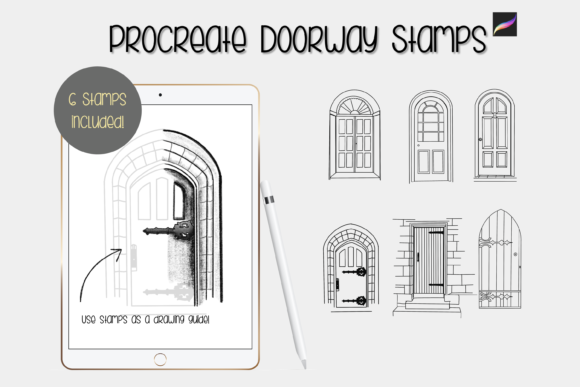
At its simplest, Procreate Door Stamps X 6 is a pack of six unique individual digital brushes designed specifically for the Procreate application on iPad. Unlike standard painting brushes that simulate media like oil, watercolor, or charcoal, these are stamp brushes. Each stroke places a pre-designed graphic—in this case, various door illustrations—onto the canvas. The "hand-drawn" nature of these elements ensures they retain an organic, artistic feel rather than appearing as rigid, vector-like clip art. This distinction is vital for creators aiming to maintain a cohesive, illustrative aesthetic across their work.
The primary value proposition here is time savings combined with artistic consistency. Drawing intricate architectural details from scratch requires significant skill and time. By using these stamps, creators can instantly populate scenes with high-quality door illustrations, allowing them to focus on composition, lighting, and narrative elements. The pack is marketed towards a broad audience, including those creating greeting cards, scrapbooking layouts, invitations, wall art, and wrapping paper. Additionally, the rise of print-on-demand services means these digital assets can be leveraged for commercial products, provided the user adheres to licensing agreements.
Technical Performance and Workflow Integration
To evaluate the effectiveness of Procreate Door Stamps X 6, one must look at how they perform within the Procreate environment. These files are digital brushes that will only work within the Procreate App. Consequently, compatibility is strictly limited to users with an iPad and the Procreate software installed. It is important to note that an Apple Pencil is required to fully utilize the pressure-sensitive features of the app, although basic stamping can be achieved with touch input.
One of the standout technical features of these brushes is their flexibility regarding size and color. All brushes can be resized and recolored to suit specific project needs. Resizing can be accomplished directly through the brush resize tool in Procreate, offering quick adjustments during the drawing process. Alternatively, once a stamp is placed, it can be manipulated using the move and resize tool, allowing for precise positioning and scaling. This dual approach to resizing provides a level of control that is often missing in simpler clip-art solutions.
Furthermore, the brushes are pressure sensitive in terms of opacity when using the Apple Pencil. This feature allows for subtle variations in the intensity of the stamp, which can be particularly useful when layering elements or creating depth. For instance, a lighter opacity might suggest a door in the background or one obscured by fog, while full opacity draws immediate attention to a focal point. This responsiveness enhances the natural feel of the artwork, preventing the stamps from looking flat or disconnected from the rest of the illustration.
Creative Applications and Advanced Techniques
While the immediate use of these stamps is straightforward, their true potential is unlocked through advanced digital painting techniques. The product description suggests using the stamps as a guide for creating watercolor illustration art pieces. This is a sophisticated workflow that elevates the asset from simple clip art to a foundational sketching tool. The recommended method involves placing the stamp, reducing its opacity, and then creating the final artwork on additional layers above it. This technique allows artists to trace over the structural lines of the door while adding their own textural nuances, brushwork, and color variations, resulting in a unique piece that retains the correct perspective and proportion of the original stamp.
Another powerful application involves the use of textures and clipping masks. Digital art can sometimes appear too clean or sterile. By applying textures to the door stamps, creators can introduce grain, paper effects, or weathering that adds realism and character. Clipping masks allow these textures to be confined strictly to the shape of the door, ensuring that the rest of the composition remains unaffected. This level of integration is essential for professional-grade work where cohesion between elements is paramount.
The versatility of the pack extends to various industries. For educators, these stamps could be used to create engaging visual aids for storytelling or history lessons. For marketers and small business owners, they offer a quick way to generate unique visuals for social media posts, email headers, or promotional materials without the need for expensive custom illustrations. The ability to recolor the doors means they can be easily adapted to match brand guidelines or seasonal themes, enhancing their long-term value.
Limitations and Technical Requirements
Despite their utility, it is essential to approach Procreate Door Stamps X 6 with a clear understanding of its limitations. First and foremost, these are not standalone image files. They are brush sets that require the Procreate app to function. Users without an iPad or those who prefer desktop-based software like Photoshop or Illustrator will find these files unusable. This ecosystem lock-in is a significant consideration for creators who work across multiple platforms.
Additionally, the reliance on digital downloads means that users must have a reliable platform and method for downloading and installing the files. The process typically involves downloading a .brushset or .procreate file and importing it into the app. While generally straightforward, this can pose a slight barrier for less tech-savvy users. Furthermore, because these are pre-designed elements, there is an inherent limit to customization. While color and size can be changed, the fundamental shape and design of each door are fixed. Creators seeking complete freedom to alter the architectural structure may find this restrictive compared to drawing from scratch.
Who Benefits Most from This Tool?
The ideal user for Procreate Door Stamps X 6 is likely a digital illustrator, graphic designer, or hobbyist who already operates within the Apple iPad ecosystem. Professionals who need to produce high volumes of content, such as greeting card designers or print-on-demand sellers, will appreciate the speed and consistency these brushes offer. Hobbyists and scrapbookers will value the ease of use and the artistic quality of the hand-drawn elements.
Entrepreneurs and small business owners who manage their own marketing materials may also find significant value in this pack. The ability to quickly create visually appealing graphics without hiring a dedicated illustrator can reduce costs and turnaround times. However, success depends on the user’s willingness to learn basic Procreate techniques, such as layer management and opacity adjustment, to fully leverage the tool’s capabilities.
Final Assessment of Value and Usability
In conclusion, Procreate Door Stamps X 6 serves as a specialized tool that addresses a specific need in digital illustration: the quick and artistic inclusion of architectural elements. Its strengths lie in its ease of use, flexibility in resizing and recoloring, and compatibility with advanced techniques like clipping masks and under-drawing. While it is not a substitute for fundamental drawing skills, it acts as a powerful accelerator for workflows that demand both speed and aesthetic quality.
For creators who prioritize efficiency and already invest in the Procreate ecosystem, this brush pack offers a tangible return on investment. It transforms a potentially time-consuming task into a seamless part of the creative process. However, users must be aware of the technical prerequisites and the static nature of the designs. When used thoughtfully, particularly with the recommended watercolor guide technique, these stamps can enhance the depth and professionalism of digital artworks, making them a worthy addition to a modern creator’s toolkit.