30 Hearts for Valentines, Brush Stamps: A Practical Guide for Procreate Artists
Digital illustration has democratized creativity, allowing anyone with an iPad to produce professional-grade artwork. Among the most popular tools for seasonal design are stamp brushes, which streamline the creation of repetitive elements like hearts, stars, or floral patterns. The 30 Hearts for Valentines, Brush Stamps set is a specialized collection designed specifically for this purpose. However, the ease of use offered by digital stamps often leads to overlooked technical requirements and workflow inefficiencies. Many creators purchase these assets without fully understanding the ecosystem they operate within, leading to frustration rather than inspiration.
This guide addresses the common pitfalls associated with using heart stamp brushes in Procreate. By understanding the technical limitations and best practices, you can ensure that your Valentine’s Day projects are both efficient and visually compelling. Whether you are a seasoned illustrator or a hobbyist creating your first digital postcard, avoiding these common mistakes will save you time and enhance the quality of your final output.
Understanding Compatibility: The Procreate Exclusive Nature
The most frequent error users make is assuming universal compatibility across digital art platforms. It is crucial to emphasize that the 30 Hearts for Valentines, Brush Stamps are compatible with the Procreate app only. These brushes do not work in Photoshop, Clip Studio Paint, Adobe Fresco, or any other desktop or mobile illustration software. This limitation is not a flaw but a result of how Procreate handles brush engines and file formats, specifically the .brushset extension.
Attempting to import these files into other applications will result in errors or unrecognized file types. For professionals who switch between devices, this means you cannot rely on this specific set for cross-platform workflows. If you primarily work on a desktop computer, these stamps will be unusable. Before purchasing or downloading, verify that your primary workflow is centered around the iPad ecosystem. If you are a multi-platform user, consider this set as a supplementary tool for mobile-only projects rather than a core asset library.
Furthermore, hardware requirements are strict. To use these brushes effectively, you need an iPad Pro, Apple Pencil, or a compatible pressure-sensitive stylus. While Procreate supports touch input, the nuance of stamp brushes—especially those with varying opacity or size dynamics—often relies on pressure sensitivity. Using a non-compatible stylus may result in inconsistent stamp sizes or opacity levels, undermining the uniformity required for clean, professional designs.
Installation and Setup: Avoiding Import Errors
Even within the Procreate environment, users often struggle with the initial setup. The process is straightforward but requires precise steps. After downloading the brush set file, you must import it directly into your Procreate brush library. A common mistake is trying to open the file through the iOS Files app without selecting "Open in Procreate." This can lead to confusion about where the brushes have gone.
To avoid this, follow these steps:
- Download the .brushset file to your iPad.
- Tap the file and select "Share" or "Open in."
- Choose Procreate from the list of applications.
- Procreate will automatically import the 30 stamp brushes into a new group at the top of your brush library.
Once imported, organize your workspace. Leaving the new brushes in the default "Imported" group can clutter your library over time. Create a dedicated folder named "Valentine Stamps" or "Heart Brushes" to keep your assets organized. This simple organizational habit prevents the frustration of searching for specific stamps during tight deadlines.
Design Pitfalls: Overusing Stamps and Lack of Variation
While stamp brushes are designed for speed, they can inadvertently lead to repetitive and sterile designs if used incorrectly. A significant misunderstanding among beginners is that stamps are "plug-and-play" solutions that require no artistic intervention. Relying solely on tapping the screen with identical settings results in illustrations that look mechanical and lack the organic feel of hand-drawn art.
To create cute postcards and illustrations that stand out, you must introduce variation. Here are practical strategies to avoid the "stamp look":
- Vary Size and Rotation: Do not use the same brush size for every heart. Manually adjust the size slider between stamps to create depth and visual interest. Rotate your canvas or the stamp itself to avoid a uniform orientation.
- Layering and Opacity: Use multiple layers for your stamps. Lower the opacity of background hearts to create a subtle texture, while keeping foreground hearts solid and vibrant. This technique adds dimensionality to your composition.
- Color Harmony: Avoid using the default black or single-color strokes. Experiment with Procreate’s color harmony tools to select complementary shades of red, pink, and white. Monochromatic schemes can look flat; introducing slight hue variations makes the design feel more dynamic.
Additionally, consider the context of your design. If you are creating a postcard, ensure that the stamps do not overwhelm the text or central message. Use the hearts as border elements or background textures rather than the focal point, unless the illustration is abstract. Balance is key to maintaining readability and aesthetic appeal.
Evaluating Quality and Usability Before Commitment
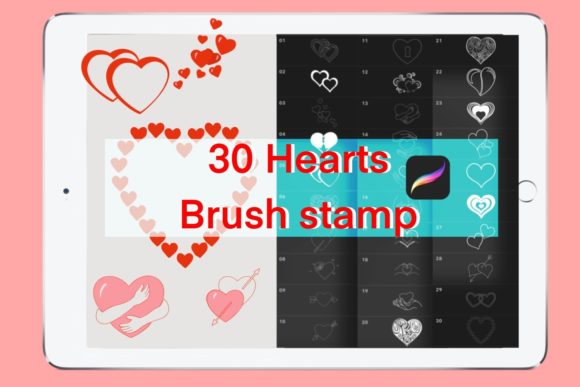
Before integrating the 30 Hearts for Valentines, Brush Stamps into your professional workflow, evaluate their suitability for your specific project needs. Not all heart shapes fit every brand identity or artistic style. Some stamps may feature rough, sketchy edges, while others are clean and vector-like. Review the included 30 stamp brushes to identify which styles align with your current project.
Check the resolution and scalability of the stamps. While Procreate brushes are generally scalable, excessive enlargement can lead to pixelation or loss of detail. Test the largest heart stamp at your intended output size to ensure clarity. If you are designing for large-format prints, verify that the brush settings maintain crisp edges at high resolutions.
Another often-overlooked aspect is the licensing terms. If you are a freelancer or small business owner creating commercial products, ensure that the brush set allows for commercial use. Most individual brush creators permit commercial use for end-products (like postcards or illustrations), but restrictions may apply to reselling the brushes themselves. Always review the license agreement to protect your business from legal issues.
Maximizing Efficiency in Your Workflow
The true value of stamp brushes lies in efficiency. To maximize this benefit, integrate the 30 Hearts for Valentines, Brush Stamps into a streamlined workflow. Use Procreate’s QuickMenu to assign frequently used heart stamps for instant access. This reduces the time spent navigating through brush libraries and allows you to maintain creative flow.
Combine stamp brushes with other Procreate features, such as symmetry guides and drawing assists. For example, use the radial symmetry tool to create mandala-like heart patterns quickly. This approach transforms simple stamps into complex, intricate designs with minimal effort. Additionally, utilize the animation assist feature to create simple GIFs for social media, where hearts pulse or appear sequentially.
In conclusion, the 30 Hearts for Valentines, Brush Stamps offer a powerful tool for enhancing your digital art, provided you understand their limitations and potential. By ensuring compatibility with Procreate, organizing your library, introducing artistic variation, and respecting licensing terms, you can avoid common pitfalls and create stunning, professional-quality Valentine’s Day designs. Remember, these tools are meant to aid your creativity, not replace it. Use them wisely to elevate your illustrations and engage your audience with heartfelt, visually appealing content.