Mastering Digital Botanicals: A Practical Guide to the Procreate Foliage Wreath Creator
In the evolving landscape of digital illustration, efficiency often dictates the viability of a creative project. For artists, designers, and hobbyists working within the Apple ecosystem, the Procreate Foliage Wreath Creator represents a specialized toolset designed to streamline the creation of complex botanical compositions. Unlike standard brush packs that offer isolated leaves or stems, this collection functions as a comprehensive system for building layered, organic structures. Understanding whether this specific toolkit aligns with your workflow requires a clear assessment of its components, limitations, and potential applications in both digital and print media.
Understanding the Toolkit Composition
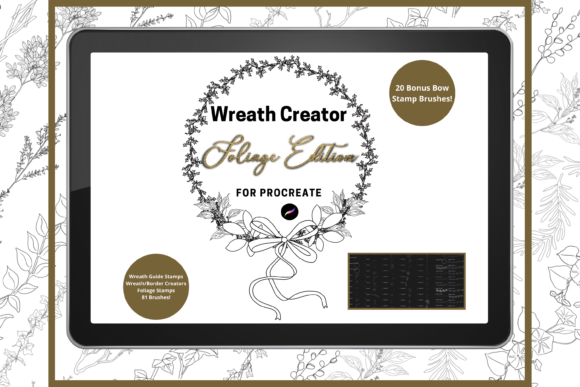
The core value of the Procreate Foliage Wreath Creator lies in its volume and versatility. The pack contains 101 unique, hand-drawn digital brushes. This is not merely a collection of static stamps; it is a modular system. Among these, twenty are dedicated bow brushes, while the remainder consists of foliage stamps and border wreath creators. The distinction here is critical for users evaluating their needs. A standard leaf brush might require hundreds of individual strokes to form a cohesive circle, whereas a wreath creator brush allows for the rapid establishment of structure.
These elements are designed for flexibility. Every brush can be resized and recolored, allowing for extensive customization without the need for external editing software. This adaptability is essential for professionals who need to maintain brand consistency across different projects or for hobbyists who wish to experiment with seasonal color palettes. The hand-drawn nature of the assets ensures that the output retains an organic, authentic feel, avoiding the sterile perfection often associated with vector-based clip art.
Digital Crafting vs. Print-on-Demand Applications
When considering the acquisition of digital assets, it is vital to distinguish between personal enjoyment and commercial utility. The Procreate Foliage Wreath Creator bridges this gap effectively. For those engaged in continued digital crafting, such as creating social media graphics, digital planners, or interactive invitations, the immediate usability of these brushes saves significant time. The ability to layer elements means that artists can create depth and texture that static images cannot replicate.
However, the utility extends beyond the screen. These instant download hand-drawn created digital brushes are perfect for DIY projects intended for physical goods. The high resolution of Procreate files, when exported correctly, makes them suitable for printing on greeting cards, scrapbooking materials, and wall art. Furthermore, the rise of print-on-demand services has created a market for unique, niche designs. Users can leverage these foliage stamps to create wrapping paper patterns, invitation borders, or textile designs. The key advantage here is exclusivity; by building custom wreaths from the brush components, creators produce original artwork rather than relying on overused stock photography.
Technical Workflow and Layer Management
To maximize the potential of the Procreate Foliage Wreath Creator, users must adopt a disciplined approach to layer management. The documentation accompanying the brush pack emphasizes a specific technique: using different layers for different stages of construction. This is not merely a suggestion but a technical necessity for maintaining editability.
When building a wreath, overlapping elements can quickly become visually chaotic. A practical method involves placing initial structural stamps on a lower layer and reducing their opacity. This transparency allows the artist to see exactly where new elements need to be placed to fill gaps without causing unrealistic, messy overlaps. Once the composition is balanced, the opacity can be restored, and unnecessary parts can be erased or masked. This non-destructive workflow ensures that adjustments can be made late in the design process without starting from scratch.
For those unfamiliar with Procreate’s layer system, there may be a learning curve. However, the investment in understanding these mechanics pays dividends in the quality of the final output. The brushes are tools, not magic buttons; their effectiveness is directly proportional to the user’s willingness to engage with the software’s capabilities.
Hardware and Software Constraints
A critical factor in evaluating the Procreate Foliage Wreath Creator is the hardware requirement. It is imperative to note that these files are digital brushes that will only work within the Procreate App. They are incompatible with Adobe Photoshop, Illustrator, Canva, or any other design platform. To utilize this toolkit, you must have an iPad with the Procreate App installed and, ideally, an Apple Pencil for precise control.
This limitation defines the target audience. If you primarily work on a desktop computer or prefer vector-based workflows in Illustrator, this product will not serve your needs. Additionally, the installation process requires a platform to download the files, such as iCloud or a similar cloud storage service, before importing them into Procreate. Users who are not comfortable with file management on iOS devices may find the setup process slightly cumbersome compared to plug-and-play software extensions.
Comparing Approaches: Brushes vs. Pre-made Clip Art
When deciding between purchasing a brush pack like the Procreate Foliage Wreath Creator and buying pre-made clip art bundles, several tradeoffs emerge. Pre-made clip art offers immediate results; you drag and drop a finished wreath onto your canvas. This is ideal for users with tight deadlines or limited design skills. However, clip art is static. Changing the color or shape often requires advanced editing skills or results in a generic look.
In contrast, the brush pack approach offers infinite variability. You are not limited to the ten wreaths included in a clip art pack. You can create hundreds of unique combinations by mixing foliage types, adjusting sizes, and altering colors. This makes the brush pack a better long-term investment for creators who produce content regularly. The initial time investment in learning to build the wreaths is offset by the endless creative possibilities. For occasional users, however, the learning curve might make pre-made elements a more pragmatic choice.
Best-Fit Scenarios and Limitations
The Procreate Foliage Wreath Creator is best suited for:
- Digital Artists: Those who already use Procreate for illustration and want to speed up their background or decorative element creation.
- Small Business Owners: Entrepreneurs selling printed goods like stationery, where unique, hand-drawn aesthetics add value to the product.
- Hobbyists: Individuals interested in digital scrapbooking or creating personalized invitations for events.
Conversely, this toolkit may not be the right choice if:
- You do not own an iPad or prefer working on a computer.
- You require vector files for large-scale signage or branding that needs infinite scalability without pixelation.
- You need immediate, zero-effort results and are unwilling to learn layer management techniques.
Making an Informed Decision
Choosing the right digital resources depends on your existing workflow and future goals. The Procreate Foliage Wreath Creator offers a robust, flexible solution for botanical design within the Procreate environment. Its strength lies in the balance between convenience and creative control. By providing 101 unique brushes, including bows and foliage stamps, it empowers users to create bespoke designs that stand out in a saturated market.
Before purchasing, consider your comfort level with the Procreate interface and your hardware setup. If you are already invested in the Apple ecosystem and seek to enhance your digital crafting capabilities, this toolkit provides a logical next step. For those exploring alternatives, ensure that the restriction to raster-based, iPad-only usage aligns with your broader design strategy. Ultimately, the value of this resource is realized not just in the brushes themselves, but in the unique, hand-crafted aesthetic they enable you to achieve efficiently.