Grunge Shadow Procreate Brush Bundle: A Practical Evaluation for Digital Lettering
Digital illustration and hand-lettering have evolved significantly with the advent of powerful tablet applications like Procreate. For artists seeking to add texture, depth, and a raw aesthetic to their typography, specialized tools are often necessary to achieve professional results efficiently. The Grunge Shadow Procreate Brush Bundle is a digital asset designed specifically for this purpose. This article provides an objective overview of the bundle, its functionality, installation process, and suitability for various creative workflows, helping you determine if it aligns with your design goals.
Understanding the Grunge Shadow Procreate Brush Bundle
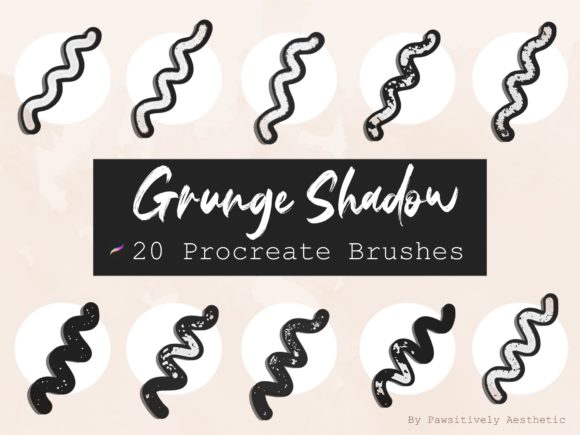
The Grunge Shadow Procreate Brush Bundle is a collection of twenty custom brushes packaged in a single .brushset file. As the name suggests, these tools are engineered to create grunge-style lettering with integrated shadow effects. Rather than manually drawing shadows or applying complex layer styles, users can utilize these brushes to generate textured, distressed looks in real-time. The primary value proposition here is efficiency; the brushes combine stroke texture and shadow displacement into a single action, streamlining the creation of rugged, urban, or vintage-inspired typography.
It is important to note that this product is exclusively compatible with the Procreate app on iPad. It does not function with Photoshop, Illustrator, or other desktop-based software, nor does it work with Android-based drawing applications. This specificity ensures that the brushes are optimized for Apple Pencil pressure sensitivity and tilt features within the Procreate environment.
Key Features and Technical Specifications
When evaluating digital brush sets, understanding the technical deliverables is crucial. Upon purchase, users receive one .brushset file containing twenty distinct brushes. These brushes are pre-configured to offer a variety of grunge textures and shadow angles. The "grunge" aspect typically refers to irregular edges, noise, and wear-and-tear effects that mimic traditional media like charcoal, dry ink, or stamped rubber.
The installation process is straightforward, leveraging iOS file management systems. After downloading the file, users locate it in the iPad’s Files app under the Downloads section. Tapping the .brushset file triggers an automatic import into Procreate. This seamless integration reduces friction for new users who may be unfamiliar with manual brush installation procedures. However, users must ensure they have sufficient storage space and the latest version of Procreate to avoid compatibility issues.
Benefits for Digital Artists and Designers
The primary benefit of the Grunge Shadow Procreate Brush Bundle is time savings. Creating realistic grunge effects manually requires significant skill and patience. Artists must often use multiple layers, masks, and texture overlays to achieve a convincing look. With these pre-made brushes, the same effect can be achieved in a single stroke. This is particularly advantageous for commercial projects with tight deadlines, such as social media graphics, poster designs, or merchandise mockups.
Additionally, the bundle offers consistency. When creating a series of designs, maintaining a uniform aesthetic is essential. Using a dedicated brush set ensures that the texture and shadow style remain cohesive across different pieces of lettering. This consistency helps in building a recognizable brand identity or artistic style without the variability that comes from manual texturing techniques.
Considerations and Tradeoffs
While the convenience of pre-made brushes is appealing, there are tradeoffs to consider. One limitation is the lack of customization compared to building brushes from scratch. Users are confined to the twenty presets provided. If a project requires a specific shadow angle or texture density not included in the set, artists may need to adjust layer properties manually or seek additional tools. Furthermore, relying heavily on preset brushes can sometimes lead to a generic look if not combined with original artistic input.
Another consideration is the learning curve associated with digital lettering itself. While the brushes simplify the texturing process, they do not replace the need for fundamental typography skills. Users must still understand letterforms, spacing, and composition to create visually appealing designs. The brushes are a tool, not a substitute for design knowledge.
Ideal Use Cases
The Grunge Shadow Procreate Brush Bundle is a strong fit for several specific scenarios:
- Social Media Content Creation: Influencers and marketers often need quick, eye-catching typography for posts and stories. The grunge aesthetic stands out in crowded feeds, and the speed of these brushes facilitates rapid content production.
- Merchandise Design: T-shirts, stickers, and posters often benefit from rugged, textured lettering. The brushes allow designers to prototype and finalize designs directly on the iPad, streamlining the workflow from concept to print-ready file.
- Personal Art Projects: Hobbyists exploring digital lettering can use these brushes to experiment with styles without investing hours in texture creation. This lowers the barrier to entry for achieving professional-looking results.
When to Consider Alternatives
Despite its advantages, the bundle may not be suitable for everyone. If you primarily work on desktop software like Adobe Photoshop or Affinity Designer, this product will not meet your needs. In such cases, looking for Photoshop-compatible brush sets or vector-based texture packs would be more appropriate.
Additionally, if your design style leans towards clean, minimalist, or corporate aesthetics, grunge brushes may be irrelevant. Minimalist design often relies on sharp lines and uniform colors, where textured shadows could detract from the intended clarity. For these projects, standard hard-round brushes or vector tools are more effective.
Artists who prefer complete control over every aspect of their texture may also find preset bundles limiting. If you enjoy the process of creating custom brushes and manipulating texture maps, building your own tools might provide greater satisfaction and flexibility.
Making an Informed Decision
Before purchasing the Grunge Shadow Procreate Brush Bundle, assess your current workflow and project requirements. Ask yourself whether you frequently create grunge-style lettering and whether speed is a priority for your process. If you already own Procreate and an iPad, and you find yourself spending excessive time adding textures manually, this bundle offers a practical solution.
It is also wise to review the seller’s policies. As a digital download, no physical product will be shipped. Ensure you understand the licensing terms, which typically prohibit reselling or sharing the brush files. Respect for intellectual property supports the creator community and ensures continued development of high-quality tools.
In conclusion, the Grunge Shadow Procreate Brush Bundle is a specialized tool that addresses a specific niche in digital lettering. It offers efficiency and consistency for artists working within the Procreate ecosystem. By weighing the benefits of speed against the limitations of preset customization, you can determine if this bundle enhances your creative toolkit. For those committed to the grunge aesthetic and iPad-based workflows, it represents a valuable resource for elevating typographic designs.