Books Stamp Brushset for Procreate: A Practical Evaluation for Digital Illustrators
Digital illustration has evolved significantly with the advent of powerful tablet applications like Procreate. Among the many tools available to artists, stamp brushes offer a unique workflow advantage by allowing users to insert pre-designed elements directly into their canvas. The Books Stamp Brushset is one such collection, specifically designed for creators who frequently incorporate literary themes, library scenes, or academic motifs into their work. This article evaluates the utility, compatibility, and practical application of this brush set to help you determine if it aligns with your artistic workflow.
Understanding the Books Stamp Brushset
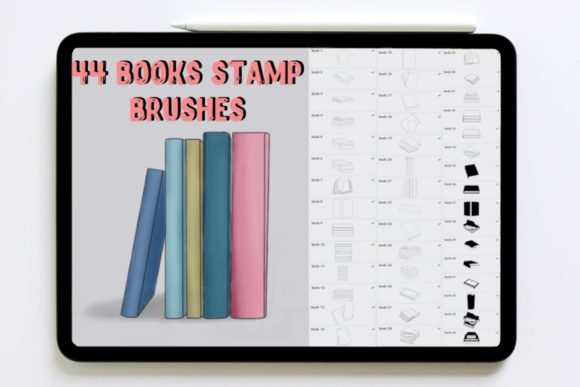
The Books Stamp Brushset is a digital asset package containing 44 distinct stamp brushes. Each brush is calibrated to imprint a specific book-related element onto your Procreate canvas with a single tap. Unlike standard painting brushes that rely on stroke dynamics, stamp brushes function more like digital stickers or stamps, placing a static or semi-static image at the point of contact.
The core value proposition of this set lies in its specificity. Rather than offering generic shapes, it focuses entirely on books. This includes various angles, sizes, and styles of books, which can range from closed hardcovers to open pages. For artists working on illustrations involving reading nooks, educational materials, or fantasy libraries, having these elements pre-rendered can significantly reduce the time spent drawing repetitive objects from scratch.
Technical Requirements and Installation
Before purchasing or downloading any digital brush set, it is crucial to understand the technical prerequisites. The Books Stamp Brushset is exclusively compatible with Procreate on the iPad. It does not work with Photoshop, Clip Studio Paint, or other desktop-based software unless you are using a specific version of Procreate for Mac, though performance may vary depending on the device specifications.
To use these brushes effectively, you will need:
- An iPad capable of running the current version of Procreate.
- The Procreate app installed on your device.
- An Apple Pencil or a compatible stylus for precise placement, although finger tapping can work for larger stamps.
The download process is straightforward. You will receive a single .zip file. Inside this archive, there is one folder containing the 44 book elements in the native .brushset file format. To install, simply tap the file on your iPad, and it should automatically open in Procreate, adding the new brushes to your library. If automatic installation fails, you can manually import the file through the Procreate brush library settings.
Benefits of Using Pre-Made Book Stamps
The primary benefit of integrating the Books Stamp Brushset into your workflow is efficiency. Drawing books realistically requires an understanding of perspective, spine curvature, and page thickness. For background elements or secondary objects in a composition, creating these from scratch can be time-consuming. Stamp brushes allow you to populate a scene quickly, freeing up mental energy for focal points like character design or lighting effects.
Another advantage is consistency. When drawing multiple books manually, maintaining a consistent style and perspective can be challenging, especially for beginners. A stamp set ensures that all book elements share a cohesive aesthetic, which helps in creating harmonious compositions. This is particularly useful for pattern design, where repeating elements need to look uniform.
Furthermore, these stamps are versatile. While they are designed as books, they can be transformed using Procreate’s free transform tool. You can resize, rotate, and distort them to fit different perspectives. This flexibility allows a single stamp to serve multiple purposes within a single illustration.
Tradeoffs and Limitations
While convenient, stamp brushes come with inherent tradeoffs. The most significant limitation is the lack of customization compared to hand-drawn elements. Since the stamps are pre-rendered images, you cannot easily change the color of the book cover or the text on the spine without additional editing layers. If your project requires specific titles or unique cover designs, you may find yourself spending more time masking and recoloring the stamps than it would have taken to draw simple book shapes manually.
Additionally, over-reliance on stamps can lead to a repetitive look in your portfolio. If every illustration features the exact same book assets, your work may lose its unique hand-crafted feel. It is essential to use these tools as a foundation rather than a crutch. Combining stamps with hand-drawn details, such as custom shadows, highlights, or surrounding clutter, can help mitigate this issue.
Resolution is another consideration. Ensure that the stamps are high-resolution enough for your intended output. If you plan to print your work at large sizes, low-resolution stamps may appear pixelated. Most reputable brush sets, including this one, are designed with sufficient resolution for standard digital and print uses, but it is always wise to test a few stamps at your target size before committing to a full project.
Ideal Use Cases
The Books Stamp Brushset is a strong fit for several specific scenarios:
- Background Art: When creating scenes for children’s books, visual novels, or concept art that feature libraries, bookstores, or study rooms, these stamps can quickly fill shelves and tables.
- Pattern Design: For designers creating wrapping paper, textiles, or digital backgrounds with a literary theme, the variety of 44 elements provides enough diversity to create seamless, engaging patterns.
- Rapid Prototyping: Concept artists who need to quickly visualize a scene composition can use these stamps to block out elements before refining the final artwork.
- Educational Content: Creators making worksheets, presentations, or social media graphics related to reading or education can use these icons to enhance visual appeal without needing advanced drawing skills.
When to Consider Alternatives
Despite its benefits, the Books Stamp Brushset may not be the right choice for every artist. If your work focuses heavily on hyper-realistic still life or requires precise control over every detail of a book’s texture and typography, manual drawing or 3D modeling might be more appropriate. Similarly, if you primarily work in vector-based software like Adobe Illustrator, raster-based Procreate brushes will not integrate seamlessly into your workflow.
Artists who prefer a completely organic, sketchy style might also find pre-made stamps too clean or rigid. In such cases, creating custom brushes from your own sketches could provide a more authentic look that matches your personal style.
Making the Decision
Evaluating whether to add the Books Stamp Brushset to your toolkit depends on your current projects and workflow preferences. Ask yourself how often you draw books or library scenes. If this is a recurring theme in your work, the time saved by using stamps can be substantial. However, if you only occasionally include books in your art, the investment might not yield significant returns.
Consider your skill level as well. Beginners may find stamp brushes helpful for achieving professional-looking results quickly, while advanced artists might use them as a base for more complex manipulations. Ultimately, the value of this brush set lies in its ability to streamline specific tasks. By understanding its capabilities and limitations, you can make an informed decision about whether it supports your creative goals.
In conclusion, the Books Stamp Brushset offers a practical solution for digital artists looking to enhance their efficiency when working with literary themes. With 44 versatile elements compatible with Procreate on iPad, it provides a balance between convenience and creative flexibility. By integrating these tools thoughtfully into your workflow, you can focus more on storytelling and composition, letting the handles handle the repetitive details.