Peacock Brush: A Practical Evaluation for Digital Artists and Designers
In the expansive ecosystem of digital art tools, specific assets often gain traction not merely through marketing, but through their utility in solving particular creative challenges. The Peacock Brush is one such resource that has captured the attention of illustrators, graphic designers, and hobbyists alike. Unlike generic toolsets that attempt to cover every possible artistic need, this brush focuses on a distinct aesthetic and functional niche. Understanding whether it aligns with your workflow requires a look beyond the surface-level visuals and into the technical specifications, compatibility, and practical application of the tool.
This article provides a balanced assessment of the Peacock Brush, exploring its unique characteristics, comparing it to broader categories of digital brushes, and helping you determine if it is the right addition to your creative toolkit. We will also clarify exactly what is included in the package to ensure there is no confusion regarding the deliverables.
Defining the Peacock Brush Aesthetic and Functionality
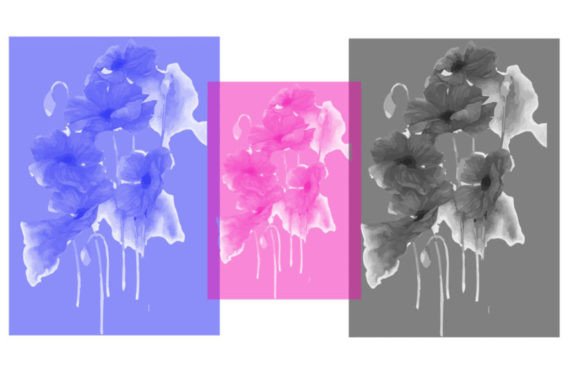
The term "Peacock" in digital art contexts usually refers to brushes that emulate the iridescent, layered, and vibrant qualities associated with peacock feathers. However, the Peacock Brush as a specific product often transcends simple texture replication. It is designed to offer a combination of opacity control, flow dynamics, and shape variation that allows artists to create rich, organic strokes with minimal effort.
What makes this brush distinct is its ability to mimic natural media while retaining the flexibility of digital manipulation. For artists working in software like Adobe Photoshop, Procreate, or Clip Studio Paint, the challenge is often finding a brush that does not feel too "digital" or sterile. The Peacock Brush addresses this by incorporating subtle irregularities in the stroke edge and pressure sensitivity responses. This results in artwork that feels hand-crafted, even when created on a tablet.
The primary use cases for this type of brush include:
- Character Design: Adding intricate details to clothing, hair, or accessories where texture adds depth.
- Environmental Art: Creating foliage, feathers, or abstract background elements that require a soft yet defined edge.
- Concept Art: Quickly blocking in shapes with a stylized flair that suggests form without requiring hyper-realistic rendering.
What Is Included in the Package?
One of the most common points of confusion for buyers of digital assets is understanding the file format and contents. Transparency is crucial here. When you purchase or download the Peacock Brush, it is typically distributed as a ZIP file. Inside this archive, you will find specific file types compatible with major digital art software.
Specifically, the package includes:
- 1 Brush File: This is the core asset. Depending on the target software, this will be either a
.brushesfile (common for Photoshop) or a.swatchesfile (often used in conjunction with other tools or older formats). It is important to note that this is a single, highly specialized brush, not a massive library of hundreds of mediocre options.
The decision to include only one brush is intentional. Many creators prefer curated, high-quality tools over bloated packs where 90% of the content goes unused. By focusing on a single, versatile instrument, the developer ensures that the user can master the tool’s nuances rather than skimming through dozens of similar variations. However, users should verify their software compatibility before downloading, as .brushes and .swatches files are not universally interchangeable across all platforms without conversion.
Comparing Peacock Brush to General Alternatives
To evaluate the value of the Peacock Brush, it is helpful to compare it against other common approaches to digital texturing and stroke creation. Most digital artists fall into one of three categories regarding their tool selection: those who use default software brushes, those who collect massive third-party libraries, and those who curate a small set of specialized tools.
Default Software Brushes vs. Specialized Tools
Most digital art applications come with a robust set of default brushes. These are reliable, optimized for performance, and free. However, they often lack the specific stylistic flair that defines an artist’s unique voice. The Peacock Brush offers a pre-configured solution for a specific look. While you could potentially replicate its effect by tweaking the settings of a standard round brush—adjusting scattering, texture overlay, and dual brush settings—this requires technical knowledge and time. The Peacock Brush provides a ready-made solution, saving setup time for artists who want to focus on creation rather than configuration.
Large Brush Libraries vs. Curated Single Assets
On the other end of the spectrum are massive brush packs containing hundreds of items. While these offer variety, they often suffer from "choice paralysis." Artists may spend more time browsing the library than actually drawing. Furthermore, large packs often contain redundant tools. The Peacock Brush represents the curated approach. It is ideal for artists who already have a solid foundation of basic tools (pencils, erasers, flat fills) and are looking for one or two signature brushes to elevate their style. If you are looking for a complete overhaul of your toolkit, a single brush may feel insufficient. However, if you are looking to refine a specific aspect of your work, such as adding organic texture to digital paintings, this focused approach is often more effective.
Strengths and Limitations
No tool is perfect for every scenario. Understanding the tradeoffs is essential for making an informed decision.
Strengths
- Immediate Usability: Once installed, the brush works out of the box. There is no need for complex calibration.
- Stylistic Consistency: Using a specialized brush helps maintain a consistent look across different pieces of artwork, which is valuable for building a recognizable portfolio style.
- Lightweight: As a single file, it takes up negligible storage space and does not slow down software performance, unlike large libraries that can clutter brush panels.
Limitations
- Software Dependency: The inclusion of
.brushesor.swatchesfiles means it is primarily tailored for Adobe ecosystems or compatible software. Users of Procreate, Krita, or Corel Painter may need to convert the file or look for platform-specific versions, which may not always be available. - Learning Curve for Style: While the brush is easy to install, mastering its pressure sensitivity and angle dynamics takes practice. It may not behave intuitively for artists accustomed to hard-edged, technical brushes.
- Niche Application: It is not a general-purpose tool. You would not use the Peacock Brush for precise line art, technical drafting, or flat color filling. It is a supplementary tool, not a foundational one.
When Is the Peacock Brush the Right Choice?
Deciding whether to integrate the Peacock Brush into your workflow depends on your current needs and artistic goals. It is likely a good fit if:
- You are an intermediate to advanced digital artist: You already understand the basics of digital painting and are looking to add nuance and texture to your work.
- You value curation over quantity: You prefer having a few reliable, high-quality tools rather than sifting through hundreds of unused options.
- Your style leans towards organic or illustrative: If your work involves nature, fantasy elements, or soft shading, this brush’s characteristics will align well with your subject matter.
- You use compatible software: You are working in Photoshop or another program that natively supports the provided file formats.
Conversely, you may want to explore other options if:
- You are a beginner: It is often better to master default brushes first to understand how digital media works before introducing specialized variables.
- You need a comprehensive toolkit: If you are starting from scratch and need brushes for inking, coloring, and texturing, a single specialty brush will not meet your needs. Look for a complete starter pack instead.
- You work exclusively on iPad with Procreate: Unless a native
.brushsetversion is explicitly provided, the installation process may be cumbersome or impossible without third-party conversion tools.
Making an Informed Decision
The Peacock Brush is a testament to the idea that sometimes, less is more. By offering a single, well-crafted tool, it invites artists to deepen their relationship with their materials rather than constantly seeking the next new thing. It is not a magic solution that will automatically improve your art, but it is a powerful instrument in the hands of someone who understands how to leverage texture and flow.
Before downloading, consider your current workflow. Do you find yourself constantly tweaking standard brushes to get a softer, more organic look? Do you struggle with adding depth to your illustrations? If so, this brush may provide the shortcut you need. However, if you are satisfied with your current toolkit or require a broad range of utilities, it may be wise to continue exploring broader collections or sticking with your established defaults.
Ultimately, the value of any digital asset lies in its integration into your creative process. The Peacock Brush offers a distinct, high-quality option for those seeking to enhance their digital painting capabilities with a touch of organic elegance. By understanding its limitations and strengths, you can decide whether it is the right piece of the puzzle for your artistic journey.