Mastering Dot Art with Dotsy Procreate Brushes
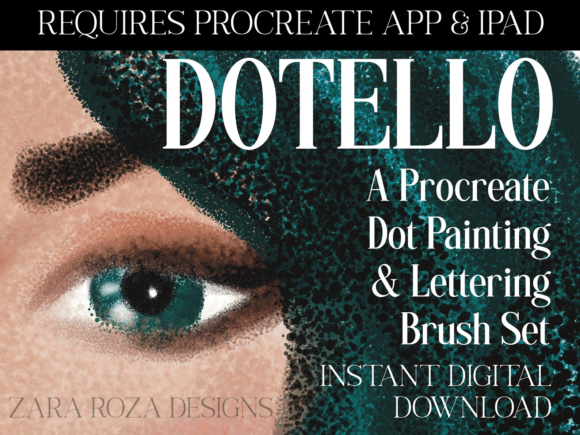
Digital stippling has long been a niche technique, often reserved for patient traditional artists willing to spend hours placing individual ink dots to create shading and texture. However, the rise of tablet-based illustration has democratized this aesthetic, allowing creators to achieve complex, minimalist designs in a fraction of the time. At the forefront of this shift is the Dotsy Procreate Brush for Dot Art, a specialized toolset designed specifically for the iPad Procreate ecosystem. For graphic designers, illustrators, and hobbyists alike, this bundle offers more than just a shortcut; it provides a consistent, professional foundation for creating clean, scalable dot-based artwork.
Why Specialized Brushes Matter in Digital Stippling
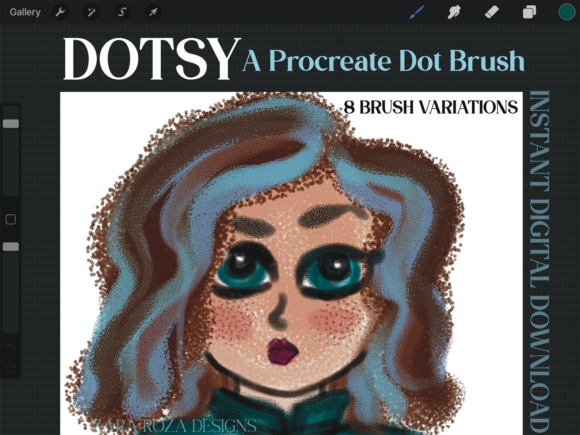
While standard round brushes can technically be used to create dots, they rarely offer the precision or uniformity required for high-quality stippling. Manual placement is tedious, and inconsistent pressure can lead to uneven spacing that looks messy rather than intentional. The Dotsy Mini Brush Set Pack Bundle addresses these pain points by offering eight distinct brush variations tailored for specific dot-art applications. Whether you are working on hand lettering, calligraphy, or intricate cartoon illustrations, having a dedicated tool ensures that every mark serves your design intent without fighting against the software’s default settings.
The core strength of this brush set lies in its versatility within a minimalist framework. By providing multiple variations, the pack allows artists to layer different dot sizes and densities. This capability is crucial for creating depth and dimension in flat designs. Instead of relying solely on color gradients, you can use density variations to suggest shadow and light, a technique that adds a tactile, organic feel to digital work. This is particularly valuable for brands aiming for a handmade, approachable aesthetic without sacrificing the scalability of vector-like graphics.
Key Features and Usability
The bundle arrives as a single .brushset file, making installation straightforward for any Procreate user. Once imported, you gain immediate access to eight unique brushes. It is important to note that this package requires the Procreate app on an iPad or iPad Pro; it is not compatible with desktop versions of Photoshop or other raster programs. This exclusivity ensures that the brushes are optimized for Apple Pencil pressure sensitivity and tilt recognition, providing a natural drawing experience.
- Eight Variations: The set includes diverse dot styles, allowing for everything from fine, precise stippling to bolder, decorative patterns.
- Seamless Integration: The
.brushsetformat installs directly into your Procreate library, keeping your workspace organized. - Minimalist Design Focus: These brushes are engineered for cute, simple, and clean aesthetics, ideal for modern graphic design trends.
One practical consideration for new users is understanding what is included versus what is not. The download typically contains a JPG file that serves as a thank-you card or preview image. This file is not part of the functional asset pack and does not include color palettes. If you are looking for pre-made swatches, you will need to create your own or source them separately. However, this limitation is minor, as most professional artists prefer building custom palettes to match specific brand guidelines or project moods.
Practical Applications Across Industries
The utility of the Dotsy Procreate Brush for Dot Art extends far beyond simple doodling. Its applications span various professional and creative fields, offering tangible benefits in efficiency and visual communication.
Branding and Graphic Design
In corporate branding, consistency is key. Dot patterns can serve as subtle background textures for business cards, social media posts, or packaging designs. Using a standardized brush set ensures that these patterns remain uniform across different materials. For entrepreneurs and marketers, this means faster turnaround times for campaign assets. You can quickly generate engaging visuals that stand out in crowded feeds without needing extensive illustration skills.
Hand Lettering and Calligraphy
Calligraphers often use stippling to add weight and emphasis to specific letters or words. The Dotsy brushes allow for precise control over this embellishment. Instead of manually drawing hundreds of tiny circles around a letterform, artists can use the specialized brushes to create consistent halos or shadows. This enhances readability and visual interest, making quotes and typographic posters more engaging for viewers.
Educational and Planning Tools
Educators and planners can leverage these brushes to create visually appealing worksheets, journals, or digital planners. Dots are excellent for creating grids, checkboxes, or decorative borders that do not overwhelm the content. For teachers creating digital resources, the ability to quickly add cute, minimalist elements can make learning materials more inviting for students. Similarly, productivity enthusiasts using GoodNotes or Procreate for planning can use these brushes to customize their layouts, adding a personal touch that boosts engagement and enjoyment.
Enhancing Workflow and Productivity
Time is a critical resource for freelancers and agency professionals. The primary benefit of adopting a specialized tool like the Dotsy bundle is the reduction of repetitive tasks. What might take thirty minutes to draw manually can be achieved in seconds with the right brush settings. This efficiency allows creators to focus on higher-level design decisions, such as composition, color theory, and messaging, rather than getting bogged down in mechanical execution.
Moreover, the consistency provided by these brushes improves the overall quality of the output. Inconsistent hand-drawn dots can distract the viewer and detract from the professionalism of the piece. By using a calibrated digital brush, you ensure that every element aligns with a high standard of polish. This is particularly important when delivering work to clients who expect pristine, publication-ready files.
Tips for Getting the Most Out of Your Brush Set
To maximize the value of your Dotsy Mini Brush Set Pack Bundle, consider experimenting with layer opacity and blending modes. Combining dot layers with solid shapes can create unique textures that mimic traditional print techniques like halftone printing. Additionally, try varying the size of the brush within a single stroke to create dynamic movement. This technique works exceptionally well for illustrating motion lines in cartoons or adding energy to abstract compositions.
It is also advisable to save your favorite color combinations as custom palettes within Procreate. Since the brush set does not include swatches, building a library of go-to colors will streamline your workflow further. Test your dots on different background colors to ensure contrast and visibility, especially if your designs are intended for small screens like smartphones.
Ultimately, the Dotsy Procreate Brush for Dot Art is more than just a digital tool; it is an enabler of creativity. By removing the technical barriers associated with stippling, it empowers artists of all skill levels to explore a versatile and timeless aesthetic. Whether you are designing a logo, illustrating a children’s book, or simply journaling your daily thoughts, these brushes provide the precision and charm needed to bring your ideas to life with clarity and style.