Mastering Wildlife Textures: A Guide to the Animal Skin Pattern Brush for Procreate
In the evolving landscape of digital illustration, texture is often the defining factor that separates a flat design from a compelling piece of art. For artists working on the iPad, the demand for tools that can quickly and accurately replicate organic surfaces has never been higher. This is where specialized assets like the Animal Skin Pattern Brush for Procreate become indispensable. Whether you are illustrating a children’s book, designing fashion textiles, or creating intricate lettering pieces, having immediate access to high-quality animal prints can significantly streamline your workflow and elevate the visual impact of your work.
The integration of these patterns into your digital toolkit offers more than just convenience; it provides a bridge between traditional artistic observation and modern digital efficiency. By understanding how to effectively utilize these brushes, creators can unlock new dimensions in their artwork, adding depth, realism, and stylistic flair without the tedious process of hand-painting every scale, spot, or stripe.
The Versatility of Digital Animal Prints
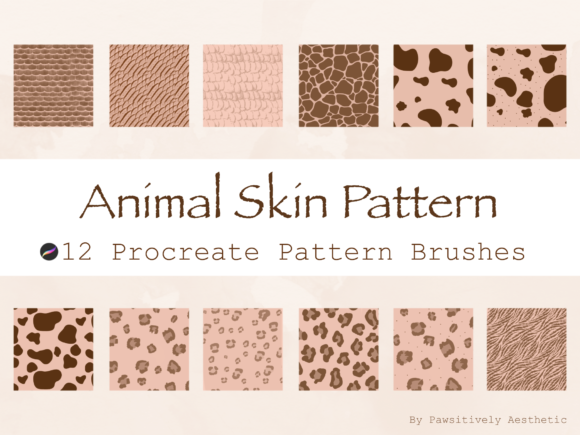
One of the most significant advantages of using a dedicated brush set for animal skins is its adaptability across various artistic disciplines. The Animal Skin Pattern Brush for Procreate is not limited to realistic wildlife portraits. Its utility extends far beyond biological accuracy, serving as a foundational element in graphic design, fashion illustration, and decorative arts.
For fashion designers, these brushes allow for rapid prototyping of textile patterns. Imagine sketching a coat or a handbag; instead of spending hours manually drawing leopard spots or zebra stripes, you can apply the pattern with a single stroke, then manipulate it using Procreate’s transformation tools to fit the contours of the garment. This accelerates the ideation phase, allowing designers to experiment with multiple print variations in a fraction of the time.
Similarly, in the realm of typography and lettering, animal prints add a layer of sophistication and interest. Designers often seek unique ways to make text stand out on posters, social media graphics, or branding materials. Using an animal skin pattern as a fill or overlay for bold letterforms creates an immediate visual hook. The contrast between the structured geometry of letters and the organic chaos of natural patterns creates a dynamic tension that captures the viewer’s attention.
Applications in Educational and Scientific Illustration
Educators and scientific illustrators also benefit greatly from precise digital tools. When creating materials for biology textbooks, museum exhibits, or educational apps, accuracy is paramount. While artistic license is acceptable in many contexts, scientific illustration requires a faithful representation of species-specific markings. A high-quality brush set ensures that the distinction between a jaguar’s rosettes and a leopard’s spots is maintained, providing a reliable resource for accurate visual communication.
Furthermore, hobbyists and amateur naturalists who enjoy journaling or creating nature-inspired art can use these brushes to enhance their sketches. Adding a subtle snake scale texture to a background or a feather-like pattern to a bird illustration adds authenticity and enriches the storytelling aspect of their journals.
Enhancing Workflow Efficiency for All Skill Levels
A common misconception about professional-grade digital assets is that they are exclusively for experts. However, the Animal Skin Pattern Brush for Procreate is designed with accessibility in mind, making it suitable for both beginners and seasoned professionals. For newcomers to digital art, these brushes remove the intimidation factor of complex texturing. Instead of struggling with layer masks, blending modes, and custom shape creation, beginners can focus on composition and color theory, letting the brush handle the intricate details of the pattern.
For professionals, time is money. The ability to generate consistent, high-resolution patterns instantly allows artists to take on more projects or dedicate more time to the creative aspects of their work rather than repetitive technical tasks. The brushes are optimized for performance, ensuring smooth strokes even on older iPad models, which is crucial for maintaining a fluid creative process.
The ease of use is further enhanced by the intuitive installation process. Once you download the files, they reside in your iPad Files app in the Downloads section. Simply finding the .brushset file and tapping on it once will automatically add the brush to the Procreate app. This seamless integration means you can go from purchase to creation in minutes, minimizing friction and maximizing creative momentum.
Technical Considerations and Best Practices
To get the most out of your Animal Skin Pattern Brush for Procreate, it is essential to understand how digital brushes interact with other features within the app. While the brushes are ready to use out of the box, combining them with Procreate’s robust layer system can yield even more impressive results.
- Layer Blending Modes: Experiment with different blending modes such as Multiply, Overlay, or Soft Light. These modes allow the animal skin pattern to interact with the colors and shadows beneath it, creating a more integrated and natural look.
- Opacity and Flow: Adjusting the opacity can help soften the intensity of the pattern, making it suitable for backgrounds or subtle textures. Lowering the flow can create a build-up effect, useful for simulating wear or variation in the skin’s appearance.
- Transformation Tools: Use the Transform tool to stretch, rotate, or distort the pattern to match the perspective of your subject. This is particularly important when applying patterns to three-dimensional objects or curved surfaces.
- Clipping Masks: Apply the brush on a layer clipped to your base shape. This ensures that the pattern stays within the lines of your illustration, allowing for non-destructive editing and easy adjustments.
It is also important to note that this is a digital download. No physical product will be shipped. This eco-friendly approach not only reduces waste but also provides instant access to your tools. However, it comes with the responsibility of proper file management. Keep your downloaded .brushset file backed up, perhaps in a cloud storage service, to ensure you can reinstall it if needed.
Ethical Use and Intellectual Property
When utilizing third-party digital assets, respecting intellectual property rights is crucial. The creators of these brushes invest significant time and expertise into developing high-quality tools. Therefore, it is imperative to adhere to the usage guidelines provided. DO NOT claim this brush set as your own, copy, share, or resell any of these brushes in any form. This restriction protects the creator’s livelihood and ensures that the community continues to have access to well-supported and updated resources.
Using these brushes in your commercial projects, such as client work, prints, or digital products, is generally permitted, but always check the specific license agreement included with your download. The value lies in the artwork you create using the tools, not in the redistribution of the tools themselves. By respecting these boundaries, you contribute to a healthy and sustainable digital art ecosystem.
Expanding Your Creative Horizon
The Animal Skin Pattern Brush for Procreate is more than just a set of stamps; it is a catalyst for creativity. It invites artists to explore textures they might otherwise avoid due to complexity. It encourages experimentation with mixed media styles, where digital precision meets organic randomness. Whether you are designing a logo, illustrating a fantasy creature, or adding a touch of wild elegance to a portrait, these brushes provide the versatility and quality needed to bring your vision to life.
As digital art continues to evolve, the tools we use become increasingly sophisticated. Embracing these advancements allows us to push the boundaries of what is possible on the iPad. By integrating specialized brushes into your workflow, you are not just saving time; you are expanding your artistic vocabulary. You gain the ability to communicate ideas more effectively, evoke emotions through texture, and create works that resonate with viewers on a deeper level.
For those looking to further enhance their digital toolkit, staying updated with new releases is key. Following developers and artists who create these tools can provide insights into new techniques, updates, and complementary resources. The world of Procreate accessories is vast, and each new tool offers an opportunity to refine your craft and discover new artistic possibilities.
In conclusion, the decision to incorporate an Animal Skin Pattern Brush for Procreate into your arsenal is a step towards greater efficiency, versatility, and creative freedom. It empowers artists of all levels to tackle complex textural challenges with confidence and ease. By understanding its applications, respecting its usage terms, and experimenting with its capabilities, you can unlock new potential in your digital art journey. Enjoy the process of creation, and let these tools help you bring your wildest ideas to fruition.