Ice Cream Popsicle Procreate DIY: Create Summer-Themed Digital Art with Ease
There is something undeniably nostalgic about the simple joy of a summer treat. Whether it’s a melting ice cream cone on a hot afternoon or a colorful popsicle shared with friends, these images evoke warmth and happiness. For digital artists, capturing this vibe can be a refreshing change of pace from complex character designs or landscape paintings. This is where the Ice Cream Popsicle Procreate DIY concept comes into play, offering a structured yet creative way to produce charming, summery artwork without starting from scratch.
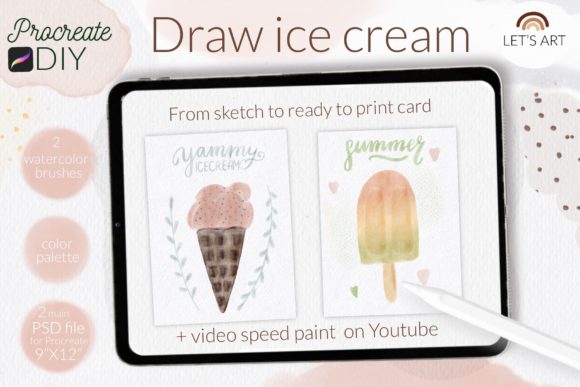
This approach is not just about drawing a sweet treat; it is about leveraging pre-made assets to streamline your workflow while maintaining artistic integrity. By utilizing a specialized kit that includes watercolor textures, custom brushes, and step-by-step guidance, you can create professional-looking illustrations that feel hand-painted and authentic. It is an ideal solution for those who want to dip their toes into digital painting or for seasoned artists looking to speed up their greeting card or social media content creation.
Why Choose a Guided DIY Approach for Digital Illustration?
Many artists struggle with the blank canvas syndrome. You have the tools, but the initial spark of composition or texture selection can be daunting. The Ice Cream Popsicle Procreate DIY kit addresses this by providing a solid foundation. It includes two PSD files designed specifically for Procreate, formatted at 9x12 inches with a high-resolution 300 DPI. This ensures that whatever you create is print-ready, making it perfect for physical products like greeting cards, posters, or stickers.
The inclusion of a watercolor paper background texture is a significant advantage. Achieving a realistic watercolor look digitally often requires layering multiple textures and adjusting blend modes, which can be time-consuming. With this kit, the texture is built-in, allowing you to focus on the painting process itself. The reference image included in the file serves as a visual guide, helping you understand proportions and color placement, which is particularly helpful if you are new to food illustration or want to ensure your final piece looks balanced.
Real-World Applications for Artists and Creators
The versatility of this DIY kit extends far beyond personal practice. Here are several scenarios where these assets can add value to your creative projects:
- Greeting Card Design: Summer birthdays and seasonal holidays are perfect occasions for cheerful, ice cream-themed cards. The high-resolution PSD files allow you to customize colors and add personalized text, creating unique prints for friends and family or customers if you run a small business.
- Social Media Content: Engaging visuals are crucial for growing an online presence. Using the hashtag letsart_Procreate_DIY on Instagram can connect you with a community of like-minded artists. The vibrant colors and playful subject matter of popsicles and ice cream are highly shareable, making them excellent for boosting engagement on platforms like Pinterest and Instagram.
- Digital Stickers and Planner Decor: If you use digital planners, creating custom stickers is a popular hobby. The decor sprinkles brush included in the kit allows you to add whimsical details to your drawings, which can then be exported as transparent PNGs for use in GoodNotes or other planning apps.
- Relaxation and Mindfulness: For many adults, digital painting is a form of meditation. The step-by-step video tutorials available on YouTube provide a calming, guided experience. Following along with a structured lesson can reduce anxiety and provide a sense of accomplishment without the pressure of creating something entirely original.
Understanding the Tools: Brushes and Swatches
A key component of achieving the desired aesthetic is the right set of tools. This kit includes one specific brush with a watercolor texture and another for decorative sprinkles. The watercolor brush is designed to mimic the fluidity and transparency of real paint, allowing for soft blends and natural edges. This is crucial for rendering the smooth, creamy texture of ice cream or the icy translucence of a popsicle.
The color swatches provided are curated to complement the summer theme. Instead of spending hours searching for the perfect pastel pink or vibrant orange, you have a pre-selected palette that works harmoniously. This not only saves time but also helps maintain color consistency across your artwork. For beginners, using a limited, well-chosen palette is often easier than managing a full spectrum of colors, leading to more cohesive and professional-looking results.
It is important to note that the brushset file is compatible with Procreate version 4.0 or later. If you are using an older iPad or an earlier version of the app, the brushset may not be available. In such cases, you can still utilize the PSD files as coloring pages, using default Procreate brushes to fill in the areas. This flexibility ensures that even users with older technology can participate in the creative process, albeit with a slightly different workflow.
How to Get Started: Installation and Setup
Getting your tools ready is the first step to a smooth creative session. If you have a newer version of Procreate, installing the brushset is straightforward. However, for those with older devices or software, here is a practical guide to installing individual .brush files:
- Download the folder containing the .brush file to a accessible location on your iPad, such as the Files app.
- Open the folder and locate the specific .brush files you wish to install.
- Tap and hold the file with your finger or Apple Pencil to bring up the context menu.
- Select "Share" from the options. This will allow you to open the file directly in Procreate, where it will automatically install into your brush library.
Once installed, you can access the watercolor and sprinkles brushes from your brush menu. Take a moment to test them on a separate layer to understand how pressure sensitivity affects the stroke width and opacity. This quick practice can save you from unexpected results when working on your final piece.
Maximizing Your Creative Output
To get the most out of the Ice Cream Popsicle Procreate DIY kit, consider experimenting with the layers. The PSD files are structured to keep your line art, colors, and textures separate. This non-destructive workflow allows you to tweak colors or adjust the intensity of the watercolor effect without ruining the underlying sketch. You can also duplicate the popsicle or ice cream elements to create patterns or backgrounds, expanding the utility of the single illustration.
Furthermore, do not hesitate to deviate from the reference image. The kit is a starting point, not a rigid rulebook. Change the flavors, add different toppings, or alter the background colors to match your personal style or brand identity. The two video tutorials on YouTube are designed to teach techniques, not just replicate a single image. Pay attention to how the instructor handles shading and highlights, as these techniques can be applied to other subjects beyond ice cream.
Whether you are looking to create a heartfelt greeting card, enhance your social media feed, or simply enjoy a relaxing afternoon of digital painting, this kit provides the necessary resources to make it happen. By combining high-quality textures, intuitive brushes, and clear guidance, it removes the technical barriers and lets you focus on the joy of creation. So, grab your iPad, open Procreate, and start painting your summer memories today.