Evaluating Watercolor Artistry for Digital Design Workflows
In the realm of digital illustration and graphic design, achieving the organic, fluid aesthetic of traditional watercolor painting can be technically challenging. Software tools often struggle to replicate the unpredictable nature of water, pigment dispersion, and paper texture. This is where specialized asset packs like Watercolor Artistry enter the workflow. Designed as an add-on brush set for Adobe Photoshop, this collection aims to bridge the gap between digital precision and analog spontaneity. For designers, illustrators, and photographers evaluating tools to enhance their creative output, understanding the specific capabilities and limitations of such a resource is essential before integration.
Understanding the Core Components
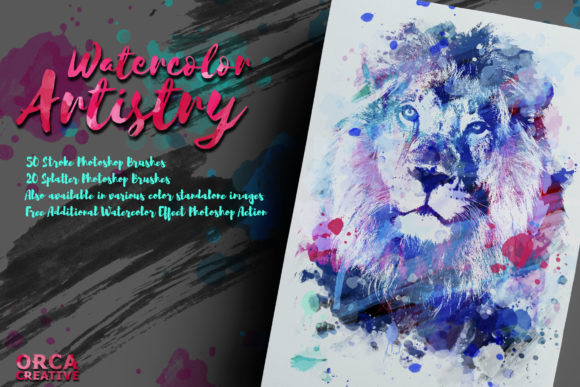
Watercolor Artistry is not merely a single tool but a composite package designed to facilitate watercolor-style compositions. At its core, the product includes 70 distinct Photoshop brushes. These are not simple stamp tools; they are engineered to mimic various stroke types, splatters, and washes inherent to watercolor media. The diversity of the brush set allows users to layer different textures, creating depth and variation that static images often lack.
Beyond the brushes, the package includes a free additional watercolor effect Photoshop action. Actions in Photoshop are automated sequences of steps that apply complex filters and adjustments with a single click. This feature is particularly valuable for users who may not have advanced knowledge of layer masking or blending modes, as it provides a quick pathway to achieving a cohesive look. The technical deliverables are straightforward: one Photoshop brushes file (.abr), one Photoshop actions file (.atn), and seven PNG files, which likely serve as texture overlays or preview assets.
Why Designers Consider Watercolor Tools
The decision to incorporate a tool like Watercolor Artistry usually stems from a desire to soften the rigid, vector-like appearance common in digital design. Watercolor aesthetics evoke feelings of nostalgia, elegance, and handcrafted quality. These emotional responses are highly valued in specific industries, such as wedding stationery, boutique branding, and editorial illustration.
For professionals working on tight deadlines, the primary appeal is efficiency. Creating realistic watercolor effects from scratch requires significant time investment in custom brush creation, texture scanning, and manual blending. A pre-packaged set allows designers to bypass the initial setup phase, enabling them to focus on composition and color theory rather than technical replication. Furthermore, the inclusion of splatters and drips adds an element of controlled chaos, which can make digital designs feel more authentic and less "computer-generated."
Benefits and Practical Applications
The versatility of the 70 brushes included in Watercolor Artistry supports a wide range of applications. For logo designers, these brushes can add a unique, artisanal touch to brand identities, distinguishing them from competitors using standard geometric fonts. In photo editing, the brushes and the included action can be used to create double-exposure effects or to blend portraits with artistic backgrounds, adding a dreamy, ethereal quality to commercial photography.
Illustrators benefit from the ability to iterate quickly. By using pre-made strokes, artists can sketch out concepts rapidly, testing different compositional arrangements without committing to detailed rendering immediately. The PNG files included in the package can also serve as standalone elements for scrapbooking designs or social media graphics, offering flexibility beyond the Photoshop environment.
Another significant benefit is the learning curve associated with the included action. For beginners, dissecting how the action applies layers and masks can provide educational insights into non-destructive editing techniques. This transforms the product from a simple utility into a learning resource, helping users understand the mechanics of digital watercolor simulation.
Tradeoffs and Technical Considerations
While the convenience of Watercolor Artistry is evident, there are tradeoffs to consider. The most notable limitation is platform dependency. As a Photoshop-specific tool, it is incompatible with other popular digital painting software such as Procreate, Clip Studio Paint, or Affinity Photo. Users invested in ecosystems outside of Adobe Creative Cloud will find this product unusable without significant conversion efforts, which may degrade quality.
Additionally, the reliance on pre-made brushes can lead to a homogenized look if not customized. If multiple designers use the same 70 brushes without adjusting opacity, flow, or color dynamics, their work may begin to look similar. To maintain originality, users must invest time in modifying brush settings and combining them with unique hand-drawn elements. The "out-of-the-box" result is rarely sufficient for high-end, bespoke projects without further refinement.
There is also the consideration of file management. Brush sets and actions can clutter a designer’s workspace if not organized properly. Users must ensure they have adequate storage and a systematic approach to installing and categorizing third-party plugins to maintain an efficient workflow.
When This Tool Is a Strong Fit
Watercolor Artistry is an ideal solution for specific user profiles. It is particularly well-suited for graphic designers who occasionally need watercolor elements but do not specialize in digital painting. For these users, the learning investment required to master native Photoshop painting tools may not yield a sufficient return on investment. Instead, a brush set offers a cost-effective shortcut.
It is also a strong fit for photographers looking to expand their service offerings. By using the included action and brushes, photographers can offer "artistic edits" as an upsell, transforming standard portraits into gallery-worthy prints. The ease of use allows them to process these edits quickly, maintaining profitability while adding value.
Furthermore, hobbyists and semi-professional illustrators who own Photoshop but lack formal training in traditional media will find this set empowering. It lowers the barrier to entry, allowing them to experiment with styles that would otherwise require years of practice to replicate manually.
When to Consider Alternatives
Conversely, there are scenarios where Watercolor Artistry may not be the best choice. Professional digital painters who prioritize complete control over every pixel may find pre-made brushes restrictive. These artists often prefer creating their own custom brushes tailored to their specific style and hardware setup. For them, investing in high-quality graphics tablets and advanced painting software might be a more appropriate allocation of resources.
Users who do not have access to Adobe Photoshop should look for alternatives compatible with their preferred software. Many competing products offer similar brush sets for Procreate or Clip Studio Paint, which may provide a more seamless experience for tablet-based workflows. Additionally, those seeking vector-based watercolor effects for scalable print materials might be better served by Adobe Illustrator brush libraries or SVG asset packs, as raster-based Photoshop brushes can lose resolution when scaled significantly.
Making an Informed Decision
Evaluating whether Watercolor Artistry aligns with your goals requires an honest assessment of your current workflow and technical skills. If you are already proficient in Photoshop and seek to accelerate your process while adding organic texture, this add-on offers tangible value. The combination of 70 brushes, an automation action, and texture files provides a comprehensive toolkit for immediate implementation.
However, if your work demands absolute uniqueness or if you operate outside the Adobe ecosystem, the limitations may outweigh the benefits. In such cases, exploring software-native tools or commissioning custom assets might yield better long-term results. Ultimately, the utility of this product lies in its ability to democratize a complex artistic style, making it accessible to a broader range of creators while acknowledging that true artistry still depends on the skill and vision of the user.