Enhancing Digital Portraits with the 20 Procreate Freckle Brush Set
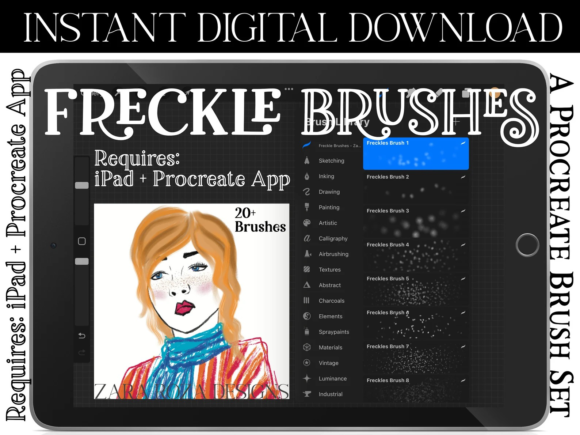
Digital portraiture has evolved significantly, moving beyond flat color blocks to embrace complex textures and organic imperfections that bring characters to life. Among the many tools available to digital artists, specialized brush packs have become essential for achieving specific aesthetic goals. The 20 Procreate Freckle Brush Set represents a targeted resource for illustrators seeking to add realism, depth, and character to facial features. This collection is designed specifically for the Procreate app on iPad, offering a streamlined workflow for adding skin texture, stippling effects, and detailed shading.
For artists who spend hours refining skin tones and facial structures, manually painting individual freckles can be tedious and often results in unnatural patterns. This brush set addresses that challenge by providing twenty distinct variations of freckle stamps and scattering tools. Whether you are aiming for hyper-realistic portraits or stylized cartoon characters, understanding how this tool fits into your broader digital art toolkit is crucial for making an informed decision about its utility in your workflow.
Understanding the Composition and Functionality
The core of this product is a single .brushset file containing twenty unique brushes. It is important to note that this is not a standalone application; it requires the Procreate app installed on an iPad or iPad Pro. Once imported, these brushes integrate directly into your existing library, allowing for immediate use without complex configuration.
The diversity within the twenty brushes is the primary value proposition. Rather than offering a single "freckle" stamp, the set includes variations in size, density, opacity, and scatter. Some brushes are designed for subtle, sparse distribution, ideal for light skin tones or distant characters. Others provide denser clusters, suitable for close-up illustrations or characters with prominent pigmentation. This variety allows artists to layer different brushes to create a more natural, random appearance, avoiding the repetitive patterns that often plague digital painting.
Beyond standard freckles, the set supports broader textural applications. The brushes can be effectively used for dot painting, stippling, and general shading techniques. This versatility means the tool is not limited to facial features; it can add grain to clothing, texture to backgrounds, or noise to graphic design elements. For graphic designers and hand letterers, these stippling effects can introduce a tactile, hand-drawn quality to otherwise clean vector-style work.
Comparing Specialized Brushes to Manual Techniques
When evaluating the 20 Procreate Freckle Brush Set, it is helpful to compare it against alternative methods of creating skin texture. The most common alternative is manual painting using a standard round brush with opacity jitter. While this method offers total control, it is time-consuming. Achieving a natural look requires careful attention to spacing and size variation, which can slow down the production process significantly.
Another alternative is using photo textures or overlay images. Artists often import high-resolution photos of skin, set the blending mode to "Overlay" or "Multiply," and mask out areas where freckles are not desired. While this approach yields high realism, it can sometimes clash with the painted style of the rest of the portrait, creating a disjointed aesthetic. Additionally, photo overlays lack the flexibility to adjust individual freckle placement or intensity without extensive editing.
The 20 Procreate Freckle Brushes occupy a middle ground. They offer the speed of a stamp or overlay but retain the artistic control of a painted element. Because the brushes respond to Apple Pencil pressure and tilt (depending on the specific brush settings within the set), artists can vary the intensity of the application dynamically. This hybrid approach is particularly beneficial for concept artists and character designers who need to iterate quickly through different looks without sacrificing stylistic consistency.
Ideal Use Cases and Artistic Styles
This brush set is versatile enough to support a wide range of artistic styles, but it excels in specific scenarios. Understanding these best-fit situations helps determine if the investment aligns with your current projects.
- Realistic Portraiture: For artists focusing on semi-realistic or realistic styles, the ability to add subtle, irregular pigmentation is key. The brushes allow for the creation of sun-kissed noses, cheeks, and shoulders, adding warmth and believability to the skin.
- Stylized and Cartoon Characters: In character design, freckles are often used as a defining trait rather than a realistic detail. The bolder brushes in the set can create distinct, graphic dots that enhance the personality of a cartoon character, making them instantly recognizable.
- Fantasy and Sci-Fi Illustrations: Beyond human skin, these stippling tools can be adapted for alien textures, scales, or magical effects. The dot-based nature of the brushes makes them suitable for creating particle effects or organic patterns on non-human subjects.
- Graphic Design and Lettering: As mentioned, the stippling capability extends to graphic design. Adding texture to hand-lettered quotes or poster designs can break up solid colors and add visual interest, giving digital work a traditional print feel.
Technical Requirements and Limitations
Before purchasing or downloading, it is essential to understand the technical constraints. The 20 Procreate Freckle Brush Set is exclusively compatible with the Procreate app on iOS devices. It does not work with Procreate Pocket on iPhone, nor does it function on desktop software like Photoshop, Clip Studio Paint, or Krita. If your workflow relies heavily on desktop applications, this specific file format will not be useful without significant conversion efforts, which may alter the brush behavior.
Furthermore, users should be aware of what is included in the download. The package contains the .brushset file and typically a JPG thank-you card or preview image. It is crucial to understand that the JPG is not part of the functional asset; it is merely a visual reference. Additionally, any color swatches provided in separate .swatches files are distinct from the brushes themselves. Colors may vary between screens due to monitor calibration, so artists should expect to adjust hue and saturation to match their specific palette.
Another limitation to consider is the learning curve associated with brush customization. While the twenty presets are ready to use, achieving the perfect look often requires tweaking settings such as size jitter, scatter, and opacity within Procreate’s brush studio. Artists unfamiliar with these parameters may initially find the results too uniform or too chaotic. However, this also presents an opportunity for growth, encouraging users to deepen their understanding of digital brush engines.
Making the Decision: Is This Set Right for You?
Deciding whether to incorporate the 20 Procreate Freckle Brush Set into your library depends on your frequency of portrait work and your desire for efficiency. If you frequently illustrate characters with diverse skin tones and textures, this set can significantly reduce the time spent on detailing. It eliminates the need to create custom brushes from scratch, providing a professional baseline that can be further customized.
However, if you primarily work in abstract styles, landscapes, or hard-surface modeling, the utility of these brushes may be limited. Similarly, if you prefer a completely manual approach to every pixel, relying on stamps might feel like a shortcut that compromises your artistic integrity. In such cases, sticking to standard round brushes with customized dynamics might be more aligned with your practice.
It is also worth considering the cost versus benefit relative to larger, all-in-one brush packs. Many comprehensive Procreate bundles include a few freckle or skin texture brushes among hundreds of other tools. If you already own a large library, check if your existing brushes can achieve similar results. If not, or if you find your current options lacking in variety, this specialized set offers a focused solution without the bloat of unused assets.
Final Thoughts on Digital Texture Tools
The 20 Procreate Freckle Brush Set is a practical tool for digital artists looking to enhance the realism and character of their portraits. By offering twenty distinct variations, it provides the flexibility needed to handle different skin types, lighting conditions, and artistic styles. While it is not a magic solution that replaces fundamental drawing skills, it serves as a powerful accelerator in the workflow of iPad-based illustrators.
Ultimately, the value of this set lies in its ability to streamline a repetitive task, freeing up creative energy for more complex aspects of illustration. For those committed to the Procreate ecosystem and interested in refining their approach to skin texture and stippling, this brush set represents a thoughtful addition to their digital arsenal. As with any artistic tool, its effectiveness depends on how well it integrates with your personal style and workflow preferences.