Elevating Winter Designs with Vector Decorative Snowflakes and Professional Brush Sets
Winter design projects often hinge on a delicate balance between whimsy and precision. Whether you are crafting holiday greeting cards, designing seasonal social media graphics, or creating intricate packaging for cold-weather products, the quality of your decorative elements can make or break the final aesthetic. This is where Vector Decorative Snowflakes become an indispensable asset for modern designers. Unlike standard clipart, high-quality vector assets combined with professional brush presets offer the flexibility needed to adapt to any canvas size or print resolution without losing clarity.
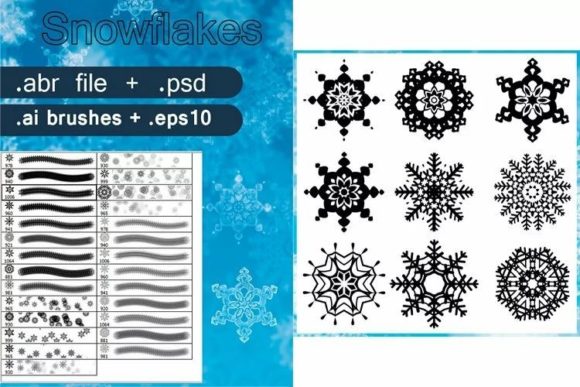
The specific collection featuring a set of nine unique ornamental snowflake brushes, complete with transparent crystal effects and sample settings presets, represents a significant upgrade from basic shape tools. By integrating these resources into your workflow, you move beyond static imagery into a dynamic design process that saves time while enhancing visual appeal.
The Power of Versatility in File Formats
One of the most critical considerations when purchasing or downloading design assets is compatibility. A robust resource pack does not limit you to a single software ecosystem. The inclusion of multiple file formats ensures that whether you are a raster-based photographer or a vector-focused illustrator, the tools fit seamlessly into your existing pipeline.
The .abr Photoshop brushes file is perhaps the most immediate tool for rapid prototyping. These brushes allow designers to paint snowflakes directly onto their compositions with natural variation. Instead of copying and pasting the same image repeatedly, which can look robotic and unnatural, brush strokes introduce organic randomness. Each stroke can vary in opacity, size, and rotation, mimicking the way real snow falls and settles. This is particularly useful for creating background textures or adding subtle atmospheric depth to photography.
For those who require absolute scalability, the .ai brushes for Adobe Illustrator and the .eps10 file are essential. Vector formats ensure that your snowflakes remain crisp whether they are printed on a business card or blown up for a billboard. The .eps10 format, in particular, offers broad compatibility with various vector editing software beyond Adobe’s suite, making it a safe choice for agencies working with diverse client setups. This universality means you never have to worry about pixelation or jagged edges, a common pitfall when using low-resolution JPEGs for print work.
Understanding the Transparent Crystal Effect
What sets this specific set apart from generic white shapes is the transparent crystal effect. Real snowflakes are not solid blocks of white; they are intricate structures of ice that interact with light. They refract, reflect, and allow background colors to show through. Incorporating this level of realism adds sophistication to your designs.
When you apply these brushes, the transparency allows underlying textures—such as paper grain, fabric patterns, or photographic backgrounds—to remain visible. This creates a cohesive look where the snowflake feels like it belongs in the scene rather than sitting awkwardly on top of it. For example, if you are designing a luxury winter skincare package, placing these crystalline snowflakes over a soft, matte background can evoke a sense of cold freshness and premium quality. The interplay of light and shadow within the vector paths mimics the physical properties of ice, adding a three-dimensional quality to a two-dimensional medium.
Streamlining Workflow with Layered PSDs and Presets
Time is a scarce commodity in professional design. The inclusion of a layered PSD file alongside the brushes significantly accelerates the editing process. Rather than building complex effects from scratch, designers can open the PSD to see exactly how the transparent effects were constructed. These layers often include adjustment masks, blending modes, and gradient overlays that can be tweaked to match specific brand colors or lighting conditions.
Furthermore, the sample settings preset serves as an educational tool and a time-saver. It provides a baseline configuration for brush dynamics, such as scattering, angle jitter, and opacity control. Beginners can use these presets to understand how professional brushes are configured, while experienced users can save them as their own defaults for future projects. This reduces the trial-and-error phase typically associated with setting up custom brushes, allowing you to jump straight into creative execution.
The JPG files included in the package serve a different but equally important purpose: quick previews and web-ready assets. While not editable in the same way as vectors or PSDs, high-resolution JPGs are perfect for mood boards, client presentations, or social media posts where rapid turnaround is more important than editability. Having these ready-to-use images ensures you always have a fallback option when time is tight.
Practical Applications Across Industries
The utility of Vector Decorative Snowflakes extends far beyond holiday cards. Consider the following scenarios where this set of nine unique ornamental brushes can add value:
- Fashion and Retail: Use the transparent crystal effects to create window display graphics that catch the eye without obscuring the merchandise behind them. The vector nature allows for easy resizing to fit various window dimensions.
- Wedding Invitations: Winter weddings are increasingly popular. The ornamental style of these snowflakes adds a touch of elegance and formality suitable for high-end stationery. The layered PSD allows couples to customize colors to match their wedding palette easily.
- Digital Marketing: Social media managers can use the .abr brushes to create consistent, branded winter-themed overlays for Instagram stories or Facebook posts. The ability to paint snowflakes quickly allows for daily content updates without heavy design overhead.
- Packaging Design: For food and beverage brands launching seasonal limited editions, the .ai and .eps files ensure that the snowflake motifs integrate perfectly with die-cut lines and printing specifications.
Choosing the Right Tool for Your Project
When deciding how to utilize this set, consider the end goal of your project. If you are working primarily in digital spaces where file size and loading speed matter, the optimized JPGs or flattened PNGs derived from the PSD might be sufficient. However, for print media, always revert to the vector sources (.ai or .eps) to guarantee the highest fidelity.
It is also worth noting the artistic variety within the set of nine unique ornamental snowflakes. Having multiple variations prevents visual monotony. In nature, no two snowflakes are identical, and your design should reflect that diversity. By rotating and combining different brushes from the set, you can create complex, clustered formations that look organic and engaging. Avoid using a single shape repeatedly; instead, mix the larger, more detailed ornaments with smaller, simpler crystals to create visual hierarchy and depth.
Another practical tip is to experiment with blending modes in Photoshop. While the brushes come with transparent effects, changing the layer mode to Screen, Overlay, or Soft Light can dramatically change how the snowflake interacts with colorful backgrounds. This technique is particularly effective for creating glowing, ethereal effects that enhance the magical feeling of winter themes.
Maintaining Quality and Consistency
To get the most out of these assets, maintain consistency in your application. If you choose a specific style of ornamentation for one part of your design, carry that theme throughout. The ornamental nature of these brushes suggests a certain level of intricacy, so pair them with clean, readable typography to avoid clutter. Let the snowflakes serve as accents rather than overwhelming the main message.
Additionally, keep an eye on color contrast. Transparent crystal effects rely on the background for context. On dark backgrounds, they may appear bright and icy; on light backgrounds, they might need a subtle drop shadow or outer glow to remain visible. The layered PSD file is invaluable here, as it likely contains pre-set effects that handle these contrast issues automatically.
In conclusion, investing in a comprehensive set of Vector Decorative Snowflakes with multi-format support is a strategic move for any designer looking to streamline their winter workflow. The combination of .abr brushes for speed, vector files for scalability, and layered PSDs for customization provides a complete toolkit. By leveraging the transparent crystal effects and unique ornamental designs, you can create visually stunning, professional-grade materials that resonate with audiences across various industries. The key lies in understanding the strengths of each file type and applying them thoughtfully to enhance, rather than distract from, your core design message.